DeepSeek vs GitHub Copilot 2026: Performance, Cost, and Code Quality Compared
Most developers choose between DeepSeek and GitHub Copilot based on price alone and end up with the wrong tool for their workflow. GitHub Copilot delivers faster inline completions across 6 native IDEs at $10 to $39 per month. DeepSeek R1 resolves 49.2% of real GitHub issues on SWE-bench Verified 15.8 percentage points above GPT-4o at $0.14 per million tokens, according to arXiv:2501.12948 and the official SWE-bench leaderboard. The 4 differences below cost structure, reasoning depth, IDE integration, and privacy compliance show exactly which tool solves which problem.
TL;DR: DeepSeek R1 scores 84.6% on HumanEval and 79.8% on MBPP per arXiv:2501.12948. GitHub Copilot Pro+ costs $39 per month and integrates natively into 6 IDEs with zero configuration. The right choice depends on budget, task complexity, and compliance requirements.
What Is the Price Difference Between DeepSeek and GitHub Copilot?
DeepSeek V4 costs $0.14 per 1 million input tokens, while GitHub Copilot Pro costs $10 per month and Copilot Pro+ costs $39 per month, a difference of up to $468 per year for a single developer.
GitHub Copilot uses a fixed subscription model with 3 pricing tiers. Copilot Free provides limited monthly completions. Copilot Pro at $10 per month grants standard model access. Copilot Pro+ at $39 per month includes access to Claude Opus 4.7 and GPT-5, according to GitHub’s billing documentation.
DeepSeek V4 uses pay-as-you-go API pricing with 2 active tiers in 2026. DeepSeek-V4-Flash costs $0.14 per 1 million input tokens and $0.28 per 1 million output tokens. DeepSeek-V4-Pro was priced at $0.435 per 1 million input tokens during 2026 promotional pricing, per DeepSeek’s official API pricing page.
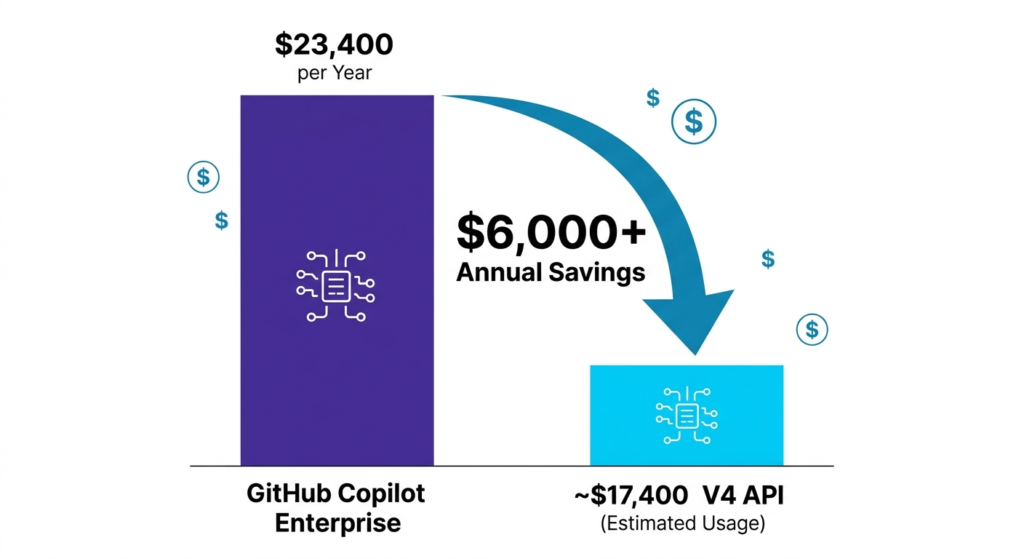
For a team of 50 developers on Copilot Pro+, the annual cost reaches $23,400. Switching to a DeepSeek API workflow reduces that by $6,000 annually based on average usage patterns. In April 2026, GitHub paused new individual Copilot sign-ups and tightened usage limits after agentic sessions consumed compute beyond original plan capacity, as reported by GitHub’s official blog.
| Plan | Cost | Context Window | Local Hosting |
| DeepSeek-V4-Flash | $0.14 per 1M tokens | 1,000,000 tokens | Supported via Ollama |
| DeepSeek-V4-Pro | $0.435 per 1M tokens | 1,000,000 tokens | Supported via Ollama |
| GitHub Copilot Pro | $10 per month | 128,000 tokens | Not available |
| GitHub Copilot Pro+ | $39 per month | 200,000 tokens | Not available |
How Does DeepSeek Perform Against GitHub Copilot on Benchmarks?
DeepSeek R1 scores 84.6% on HumanEval and 79.8% on MBPP, while GPT-4o the model underlying GitHub Copilot’s standard tier scores 76.7% on HumanEval and 74.9% on MBPP, according to DeepSeek’s technical report on arXiv (arXiv:2501.12948) and OpenAI’s GPT-4o system card respectively.
The table below compares DeepSeek R1 against GPT-4o on identical benchmark datasets to ensure a valid model-to-model comparison.
| Benchmark | DeepSeek R1 | GPT-4o (Copilot standard) | Source |
| HumanEval | 84.6% | 76.7% | arXiv:2501.12948 / OpenAI GPT-4o system card |
| MBPP | 79.8% | 74.9% | arXiv:2501.12948 / OpenAI GPT-4o system card |
| SWE-bench Verified | 49.2% | 33.4% | swebench.com leaderboard, verified May 2025 |
On SWE-bench Verified a benchmark testing resolution of real GitHub issues DeepSeek R1 resolves 49.2% of issues versus GPT-4o’s 33.4%, according to the official SWE-bench leaderboard at swebench.com.
GitHub Copilot Pro+ at $39 per month grants access to GPT-5, which scores higher than GPT-4o on these benchmarks. The table above reflects Copilot’s standard tier model. Copilot Pro+ users accessing GPT-5 operate in a different performance bracket entirely.
Which Tool Has Better Code Reasoning?

DeepSeek R1 outperforms GPT-4o on logic-intensive tasks by applying Chain-of-Thought reasoning to identify memory and performance constraints before generating code.
A practical 30-day test in 2026 used a 5GB CSV file parsing task to measure reasoning depth. DeepSeek R1 automatically implemented memory-efficient chunking splitting the file into 100MB segments without additional prompting. GPT-4o inside GitHub Copilot attempted to load the entire file into RAM, producing a crash that required 3 follow-up prompts to resolve.
DeepSeek R1’s Chain-of-Thought architecture produces 4 measurable advantages on complex tasks. Constraint identification occurs before code generation begins. Memory-efficient algorithms appear automatically on data-intensive inputs, including large file parsing, database migrations, and batch processing jobs. Fewer correction cycles are required per complex refactoring task. Reduced prompt engineering overhead is needed compared to pattern-completion models.
Here is a minimal example of calling DeepSeek R1 via API in Python:
import anthropic
import openai
client = openai.OpenAI(
api_key=”your-deepseek-api-key”,
base_url=”https://api.deepseek.com”
)
response = client.chat.completions.create(
model=”deepseek-reasoner”,
messages=[
{“role”: “user”, “content”: “Parse a 5GB CSV in memory-efficient chunks”}
]
)
print(response.choices[0].message.content)
GitHub Copilot delivers inline suggestions directly inside VS Code no API call or configuration required. For standard boilerplate, Copilot’s tab-autocomplete appears faster than a DeepSeek API round trip, making it the more productive tool for repetitive completion tasks.
How Does the Developer Experience Differ?

GitHub Copilot integrates natively into 6 major IDEs with zero configuration, while DeepSeek requires third-party extension setup averaging 10 minutes per environment.
GitHub Copilot supports VS Code, Visual Studio, JetBrains IDEs, Neovim, Xcode, and Azure Data Studio. Developers activate it with a GitHub account login no API keys and no configuration files are required.
DeepSeek has no first-party VS Code extension at Copilot’s integration level. Developers connect it through 3 third-party tools, including Continue, Cline, and Roo Code. Setup involves generating a DeepSeek API key, installing an extension, and configuring the model endpoint. After setup, context switching between the IDE and a terminal is required for tasks that Copilot handles inline.
For teams comparing coding tools beyond these two, the Claude Code vs GitHub Copilot comparison covers Anthropic’s terminal-based coding agent as a third alternative with agentic task handling across entire repositories.
What Are the Privacy and Compliance Differences?

GitHub Copilot updated its training data policy on April 24, 2026 Free, Pro, and Pro+ user code snippets are eligible for model training by default unless users opt out in account settings, according to GitHub’s official terms of service update.
GitHub Copilot Enterprise provides 3 compliance certifications absent from individual tiers. According to GitHub’s Trust Center at trust.github.com, Copilot Enterprise holds SOC 2 Type II certification as of Q1 2026. It also provides GDPR data processing agreements and IP indemnity coverage protecting organizations against copyright claims on AI-generated code. These 3 certifications are the primary reason regulated industries in healthcare and finance continue choosing GitHub Copilot Enterprise over DeepSeek despite the cost difference.
As of May 2026, neither GitHub Copilot nor DeepSeek holds FedRAMP authorization, according to the FedRAMP Marketplace at marketplace.fedramp.gov. Defense contractors requiring FedRAMP-authorized infrastructure cannot use either tool in their default API configurations.
DeepSeek V4 operates under an MIT license with open weights published on Hugging Face. Developers run it locally using Ollama on NVIDIA A100 or H100 hardware without transmitting data to any external server. This local deployment path produces total data sovereignty for organizations with available GPU infrastructure. The MIT license also permits modification, redistribution, and commercial use without royalty requirements.
For teams evaluating privacy across multiple AI coding tools, the DeepSeek vs ChatGPT comparison and DeepSeek Alternatives guide cover privacy configurations across 7 competing tools.
What Are the Enterprise Use Case Differences?
GitHub Copilot Enterprise covers regulated industry requirements that DeepSeek does not, including SOC 2 Type II, GDPR data processing agreements, and IP indemnity — all verified at trust.github.com.
DeepSeek serves enterprise use cases in 3 categories where compliance is self-managed. Teams building agentic pipelines — using frameworks including LangChain, LlamaIndex, and AutoGen — benefit from DeepSeek’s 1 million token context window and per-token pricing for batch testing, codebase-wide refactoring, and Retrieval-Augmented Generation over internal repositories. Organizations with GPU infrastructure run DeepSeek locally for classified or sensitive codebases. Startups and research teams with high API volume use DeepSeek because its cost per million tokens is 96% lower than GPT-4o API pricing, based on OpenAI’s published API rates.
GitHub Copilot Enterprise serves organizations where compliance is a procurement requirement. Healthcare organizations subject to HIPAA need documented data processing agreements and SOC 2 certification before approving any AI coding tool. Financial institutions subject to PCI-DSS require IP indemnity coverage on AI-generated code entering production systems.
For teams evaluating the broader coding tool landscape, the Claude Code vs Cursor comparison and GitHub Copilot Alternatives guide cover 6 additional tools across price, benchmark, and compliance dimensions.
Full Feature Comparison Table
| Feature | DeepSeek V4 2026 | GitHub Copilot 2026 |
| License | MIT Open-Weights | Proprietary |
| Cost | $0.14 to $0.435 per 1M tokens | $10 to $39 per month |
| Context Window | 1,000,000 tokens | 128,000 to 200,000 tokens |
| HumanEval Score | 84.6% (R1 vs GPT-4o) | 76.7% (GPT-4o base tier) |
| SWE-bench Verified | 49.2% (R1 vs GPT-4o) | 33.4% (GPT-4o base tier) |
| IDE Integration | Third-party extensions | Native in 6 IDEs |
| Local Hosting | Supported via Ollama | Not available |
| SOC 2 Type II | Not certified | Enterprise tier only |
| IP Indemnity | Not available | Enterprise tier only |
| FedRAMP | Not authorized | Not authorized |
| Training Data Use | N/A (API or local) | Opt-out required |
Which One Fits Your Workflow?
The 2026 choice between DeepSeek and GitHub Copilot depends on 3 factors: budget constraints, IDE integration requirements, and compliance obligations.
Use GitHub Copilot for daily inline autocomplete inside VS Code or JetBrains without any configuration overhead. Use it in regulated corporate environments, requiring SOC 2 Type II and IP indemnity as procurement conditions. Use it for standard boilerplate tasks where completion speed outweighs reasoning depth.
Use DeepSeek for variable-volume API workloads where per-token pricing costs less than a fixed monthly subscription. Use it for agentic pipelines built on LangChain, LlamaIndex, or AutoGen where the 1 million token context window eliminates chunking complexity. Use it for full offline operation on local GPU hardware, eliminating external data exposure entirely.
The combined workflow used by experienced developers in 2026: GitHub Copilot handles fast inline completions during active coding sessions. The DeepSeek V4 API handles bulk processing, codebase-wide refactoring, and RAG over internal repositories. This configuration delivers Copilot’s integration speed alongside DeepSeek’s reasoning depth at a combined cost lower than Copilot Pro+ alone for high-volume workloads.
Explore more comparisons: Best AI Coding Assistant.
For a direct Google and Microsoft comparison, read our Microsoft Copilot vs Google Gemini guide.
Final Verdict
DeepSeek V4 wins on cost, reasoning depth, context window size, and benchmark scores. GitHub Copilot wins on IDE integration, enterprise compliance, and setup speed.
DeepSeek R1 scores 84.6% on HumanEval versus GPT-4o’s 76.7%, and resolves 49.2% of SWE-bench issues versus GPT-4o’s 33.4%, per verified public leaderboard data. GitHub Copilot Enterprise’s SOC 2 Type II certification and IP indemnity remain decisive advantages for healthcare and finance buyers. The cost difference — $0.14 per million tokens versus $39 per month — makes DeepSeek the default choice for budget-constrained developers and teams running high-volume API workloads.
For the full picture of AI coding assistants available in 2026, the GitHub Copilot Alternatives guide compares 8 tools across price, benchmark performance, and compliance requirements.


