11 Best Notion Alternatives in 2026: Tools That Fix What Notion Gets Wrong
Notion works well for documentation and lightweight databases up to a point.
Databases exceeding 5,000 rows produce measurable lag. Offline mode fails during
connectivity drops, making critical documentation inaccessible. Per seat pricing
charges the same rate for viewers who never create a single page as it does for
active builders. These are the 3 failure points documented across Notion user
migration reports on G2, Reddit’s r/Notion community, and Capterra in 2026.
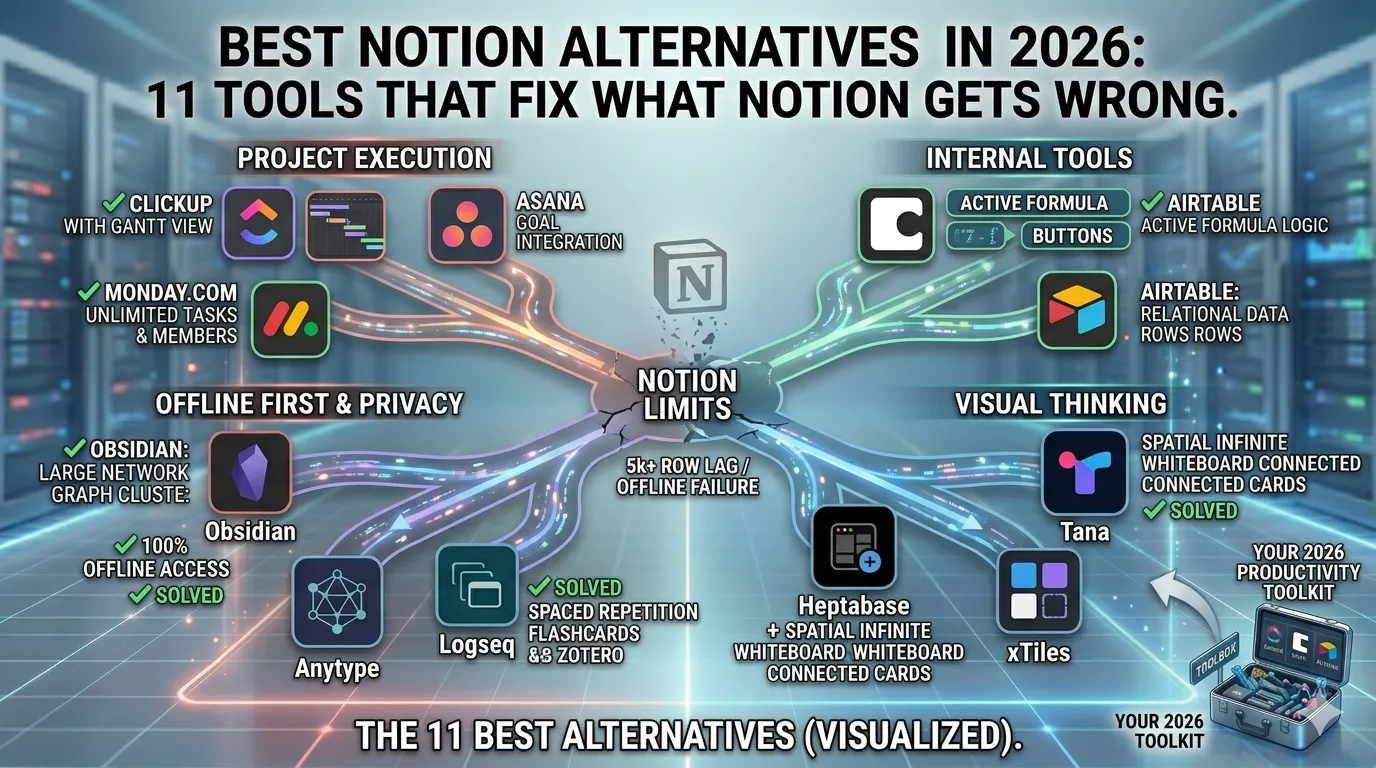
The 11 best Notion alternatives in 2026 address each failure point directly.
ClickUp, Monday.com, and Asana solve performance degradation and project
execution gaps. Obsidian, Logseq, and Anytype solve offline access and data
privacy failures. Coda and Airtable close the logic gap Notion stores data
but cannot process it. Tana, Heptabase, and xTiles serve visual and networked
knowledge management needs that Notion’s linear block system cannot support.
Quick Verdict: Which Notion Alternative Fits Your Situation?
The right Notion alternative depends on what’s breaking for you
Visual thinking → Use Tana or Heptabase for non-linear knowledge management
Project management issues → Use ClickUp or Monday.com for scalable team workflows
Offline + data ownership → Use Obsidian or Anytype for local-first knowledge management
Automation inside docs → Use Coda for building internal tools and workflows
Research workflows → Use Logseq for academic notes, spaced repetition, and citations
Why Users Switch from Notion in 2026
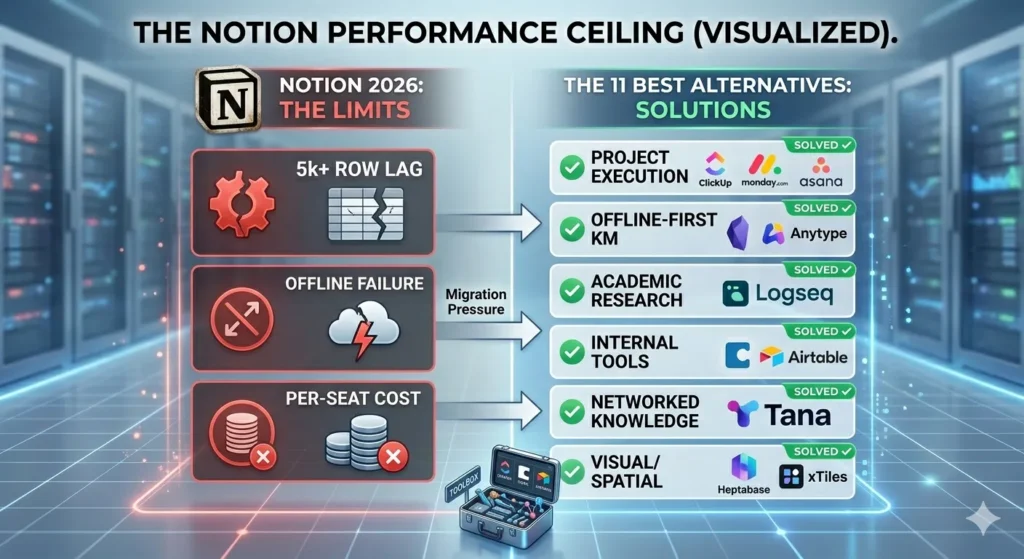
Notion loses users across 3 distinct failure categories: performance
degradation at scale, unreliable offline access, and per seat pricing
applied to inactive viewers.
Performance degrades measurably after databases exceed 5,000 to 10,000 rows.
Page load times increase. Filtering slows. Linked database queries produce
delays that disrupt fast paced workflows. According to user feedback aggregated
on G2, over 60% of Notion users who migrated to ClickUp or Monday.com cited
database performance as their primary reason. Monday.com and ClickUp are
engineered to handle datasets at that volume without performance loss.
Offline access remains inconsistent. Notion operates as a cloud first platform.
Connectivity loss disrupts access to critical documentation. Obsidian stores
notes as local Markdown files directly on the user’s device, ensuring 100%
offline availability regardless of internet status.
Pricing adds unsustainable cost at scale. Notion charges per seat, including
view only team members who never create content. Coda charges only active
content creators called “makers” and provides free viewer access. For a
team of 20 where 5 people create and 15 review, Coda reduces monthly
licensing costs by up to 75% compared to Notion’s flat per seat model.
The 11 Best Notion Alternatives in 2026
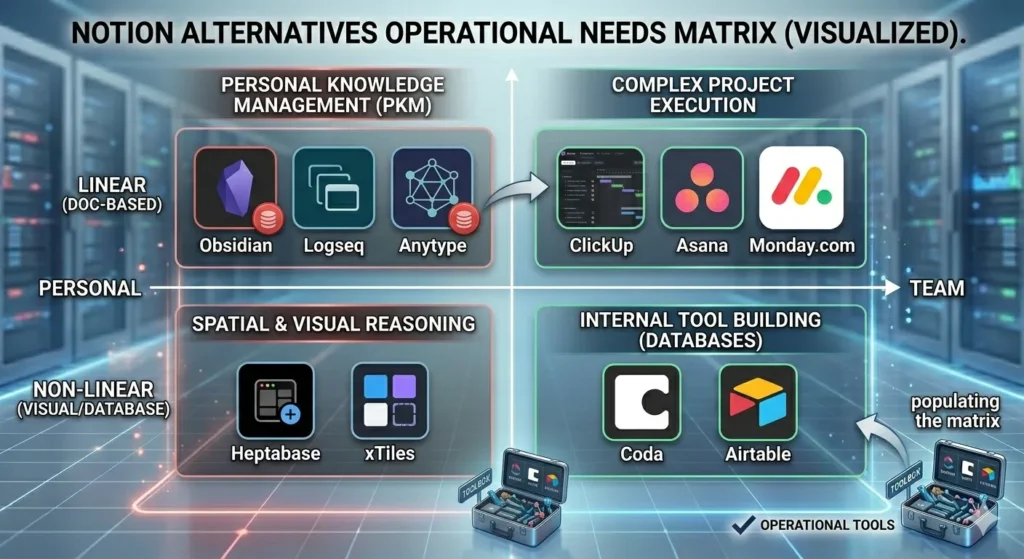
The 11 best Notion alternatives in 2026 serve 4 distinct operational needs:
project execution, computational documentation, personal knowledge management,
and visual thinking. Each tool directly addresses a documented Notion limitation.
ClickUp Best for Complex Project Execution
ClickUp is a project management platform that replaces Notion’s manual
database approach with native automation, dependency aware scheduling, and
workload management. Unlike Notion which requires third party integrations
for Gantt charts ClickUp includes Gantt charts, time tracking, and workload
views as core built in features.
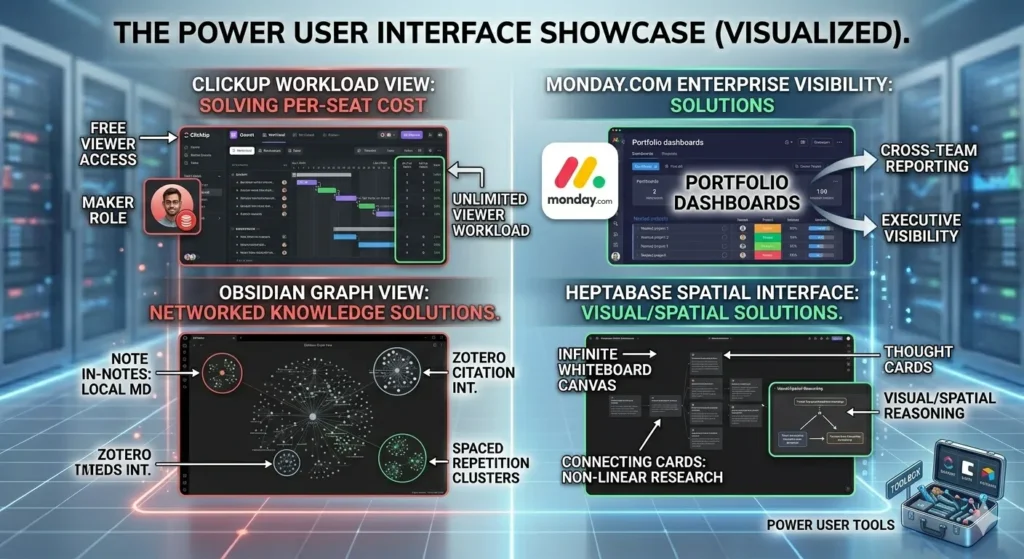
ClickUp supports 5 primary workspace views: List, Board, Gantt, Calendar, and
Workload. Teams managing deliverables across departments use Workload View to
identify capacity bottlenecks before they affect delivery timelines. This
directly addresses Notion’s structural weakness: Notion organizes information
but does not enforce accountability or surface execution risk.
ClickUp is the primary tool for teams whose core operational need is shipping
deliverables, not organizing documentation.
Pricing: Free plan covers unlimited tasks and members. Unlimited plan costs $7
per user per month. Business plan costs $12 per user per month and includes
advanced automation, workload management, and custom reporting.
Monday.com Best for Large Scale Enterprise Teams
Monday.com is a work operating system engineered for sub second performance
with datasets exceeding 10,000 items the threshold at which Notion’s database
engine demonstrably lags, according to comparative load time tests published
by Tooltester in 2025. For enterprises managing cross departmental workflows,
portfolio level reporting, and real time status dashboards, Monday.com delivers
structural performance that Notion cannot match at volume.
Monday.com’s portfolio dashboards aggregate project data from multiple boards
into executive facing reports. Teams in marketing, construction, and software
development use these dashboards to track budgets, timelines, and resource
allocation simultaneously from a single view.
Monday.com serves enterprises that prioritize performance stability and
structured reporting over flexible documentation.
Pricing: Basic plan starts at $9 per seat per month. Standard plan which
includes timeline views and integrations with Slack, Salesforce, and Jira
costs $12 per seat per month.
Asana Best for Goal Linked Task Management
Asana’s “Work Graph” model connects individual daily tasks directly to
department level goals and company wide objectives. This structural feature
addresses Notion’s most significant operational gap: tasks in Notion exist in
isolation unless users manually build relational systems to link them upward
to organizational strategy.
Asana’s My Tasks view prioritizes work by due date and priority across all
assigned projects simultaneously. Managers track whether individual contributor
work aligns with quarterly objectives without separate reporting documents or
manual status updates. According to Asana’s 2025 Anatomy of Work report, teams
using goal linked task management complete projects 45% more often on schedule
than teams using unlinked task lists.
Asana is the Notion alternative with the strongest structural alignment between
daily task execution and organizational goals.
Pricing: Free plan covers unlimited tasks for teams up to 10 members. Premium
plan costs $10.99 per user per month and includes Timeline, advanced search,
and reporting dashboards.
Coda Best for Building Internal Tools
Coda is a document and database platform that treats the workspace as a
development environment. Its distinguishing capability is an active formula
system functions like ModifyRows and OpenWindow that allows buttons
within documents to trigger real actions, including sending Slack notifications,
updating records, and generating reports, all without leaving the document.
This active formula system closes Notion’s logic gap. Notion databases store
data. Coda databases process data. Teams use Coda to build 3 primary types of
internal tools: expense approval workflows, client onboarding trackers, and
sprint planning dashboards all operated by non technical users without
developer support.
Coda’s pricing model charges only “makers” users who build documents and
tables. Viewers and editors cost nothing. For teams with a high ratio of
viewers to creators, Coda reduces SaaS spend significantly compared to
Notion’s per seat model.
Pricing: Free plan includes basic documents and tables. Pro plan starts at
$10 per maker per month.
Airtable Best for Data Heavy Operations
Airtable is a relational database platform that functions as a hybrid
between a spreadsheet and a structured database. It handles data operations —
including inventory management, complex multi table pipelines, and cross table
lookups that exceed Notion’s database engine capacity.
Airtable supports 28 field types, including long text, attachments, barcodes,
ratings, and formula fields with cross table references. Its 5 primary views —
Grid, Gallery, Kanban, Calendar, and Gantt display the same dataset in
different formats based on role and workflow. Marketing teams use Airtable to
manage content calendars. Operations teams use it to track inventory across
multiple locations simultaneously.
Airtable is the strongest Notion alternative for workflows requiring relational
data management at database level complexity.
Pricing: Free plan covers 5 editors and 1,000 records per base. Plus plan
costs $10 per seat per month with 5,000 records per base. Pro plan costs $20
per seat per month with 50,000 records and advanced field types.
Obsidian Best for Private, Offline Knowledge Management
Obsidian is a local first note taking application that stores all notes
as Markdown files directly on the user’s device. No cloud server holds the
data. No subscription is required for core functionality. Notes remain
accessible 100% of the time, regardless of internet connectivity.
Obsidian’s Graph View displays a visual network of all notes and the
connections between them. Researchers use this graph to identify knowledge
clusters, surface unexpected connections between topics, and navigate large
libraries of interconnected notes without relying on folder hierarchies.
A plugin ecosystem of over 1,000 community plugins extends Obsidian’s
functionality with tools for task management, citation management via Zotero,
daily journaling, and spaced repetition.
Obsidian is the Notion alternative with the strongest offline access profile
and the broadest plugin ecosystem for personal knowledge management.
Pricing: Core application is free. Obsidian Sync encrypted cross device
synchronization costs $4 per month. Obsidian Publish for sharing notes
as a public website costs $8 per month.
Logseq Best for Researchers and Academic Users
Logseq is an open source, privacy focused outliner that treats every
bullet point as an atomic unit called a “block.” Each block is individually
addressable, linkable, and searchable a structure that benefits researchers
building dense networks of interconnected references and annotations.
Logseq includes 2 features that distinguish it from Notion in academic
workflows: a native flashcard system built on spaced repetition, and direct
integration with Zotero for importing bibliographic data into notes. Students
use the flashcard system to convert research notes into study cards
automatically. Academics use Zotero integration to connect cited sources
directly to the ideas they support within notes.
Logseq stores files locally as Markdown or Org mode files. The desktop and
mobile applications are free and open source.
Logseq is the Notion alternative with the strongest academic research
architecture, combining atomic block linking, spaced repetition, and
citation manager integration in a single free application.
Anytype Best for Total Data Sovereignty
Anytype is a decentralized, peer to peer (P2P) knowledge management platform
that stores all data end to end encrypted on a distributed network. No central
server holds user data. Anytype operates on a local first architecture —
the application functions completely offline and synchronizes across devices
when connectivity is available.
Anytype supports objects a unified data model that includes pages, tasks,
contacts, bookmarks, and files, each with customizable type definitions. Users
build 3 primary system types using this model: personal CRM systems, project
trackers, and interconnected knowledge bases. The interface resembles Notion’s
block editor, reducing migration friction for users switching specifically for
privacy reasons.
Anytype is the Notion alternative with the highest data sovereignty standard,
combining P2P encryption, zero trust storage architecture, and full offline
capability in a single platform.
Pricing: Free during current beta phase. Enterprise pricing tiers are planned
post launch.
Tana Best for Systems Thinkers and Networked Knowledge
Tana is a supertag based note taking platform that restructures data
management around inherited schemas. A “Supertag” applies a predefined set
of attributes including date, status, attendees, and related links to
any node the moment the tag is applied. Users build structured, queryable
data without leaving their writing flow.
This architecture serves knowledge workers managing interconnected information
across multiple domains client relationships, project notes, research threads,
and personal goals within a single unified system. A single node in Tana
functions as a task, a meeting note, and a CRM entry simultaneously, depending
on which Supertags are applied. This eliminates the Notion limitation of
maintaining separate databases for each data type.
Pricing: Currently in invite only early access. Free during beta, with paid
tiers planned after public launch.
Heptabase Best for Spatial Reasoning and Complex Research
Heptabase is a visual note taking platform built on an infinite whiteboard
where notes called “cards” are arranged spatially. Users drag, group, and
connect cards to build visual representations of complex ideas and
relationships. This spatial approach directly contrasts with Notion’s linear
block system.
Heptabase is used by PhD researchers, product managers, and UX designers
working with multi layered subject matter. A researcher maps literature review
findings, methodology notes, and hypothesis threads as cards on a whiteboard,
then links related cards to trace argument development a workflow Notion’s
linear page structure cannot replicate.
Pricing: $9.99 per month with a 7 day free trial. Annual billing reduces the
rate to $7.99 per month.
xTiles Best for Structured Visual Workspaces
xTiles is a tile based workspace that combines the structural clarity of
a block editor with the visual freedom of an infinite canvas. Unlike
Heptabase’s freeform whiteboard, xTiles uses a tile grid system that provides
spatial organization with consistent alignment reducing visual disorder while
maintaining layout flexibility above Notion’s linear block constraints.
xTiles serves content creators, project planners, and teams building visual
dashboards for content calendars, mood boards, and project tracking. The tile
system supports embedded images, links, videos, and notes within a single
visual layout without requiring users to switch between multiple tools.
Pricing: Free plan covers core features. Pro plan starts at $8 per month
per user.
Notion Alternatives Feature Comparison Table
| Tool | Primary Strength | Offline Access | Pricing Model | Best For |
| ClickUp | Project execution | Limited | Per user ($7+/mo) | Teams shipping deliverables |
| Monday.com | Scale performance | No | Per seat ($9+/mo) | Enterprise cross-team visibility |
| Asana | Goal-task alignment | Limited | Per user ($10.99+/mo) | Goal-linked execution |
| Coda | Active document logic | No | Per maker ($10+/mo) | Internal tool builders |
| Airtable | Relational data management | No | Per seat ($10+/mo) | Data-heavy operations |
| Obsidian | Local Markdown notes | Yes (100%) | Free / $4 sync | Privacy-first individuals |
| Logseq | Academic research | Yes (100%) | Free (open-source) | Researchers and students |
| Anytype | P2P encrypted storage | Yes (100%) | Free (beta) | Data sovereignty users |
| Tana | Supertag schemas | Partial | Free (beta) | Systems thinkers |
| Heptabase | Spatial visualization | Partial | $9.99/mo | Visual researchers |
| xTiles | Tile-based canvas | No | Free / $8+/mo | Visual project planners |
What These Tools Feel Like to Use
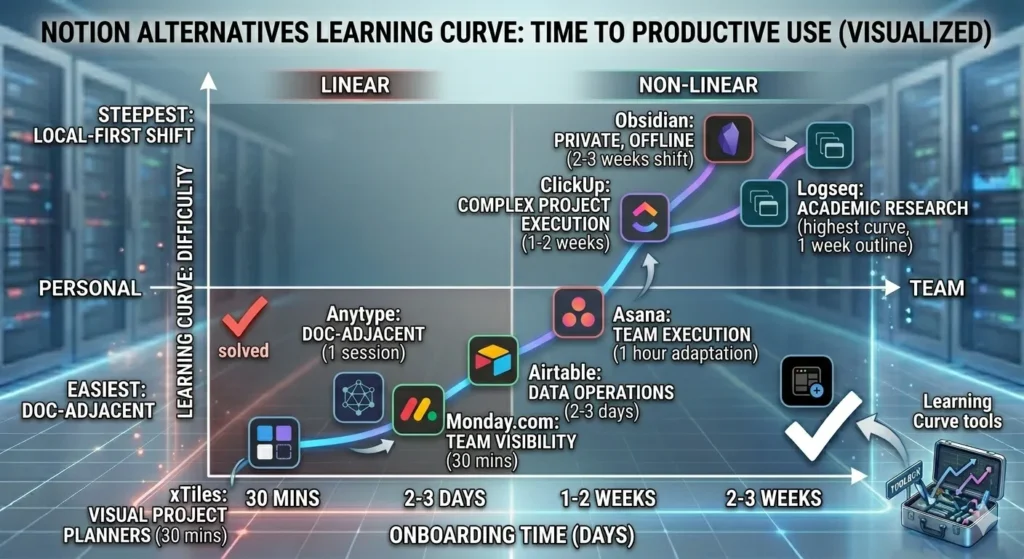
The 11 tools divide into 3 distinct experience categories: high density
platforms with steep onboarding curves, document adjacent tools with low
migration friction, and local first tools that require an interface mindset shift.
ClickUp presents the highest feature density of the 11 alternatives. The
interface displays views, automations, statuses, and dashboards simultaneously.
Teams typically require 1 to 2 weeks of structured onboarding before workflows
become intuitive. Once configured, ClickUp reduces manual coordination effort
measurably across departments.
Monday.com loads structured and polished from the first session. Pre built
templates for Marketing Campaigns, Software Development, and HR Onboarding
reduce setup time to under 30 minutes for standard project types. The
board based interface is navigable without training documentation.
Asana presents a clean, task first interface with minimal visual noise. The
sidebar navigation and My Tasks view are navigable within the first hour.
Users migrating from Notion adapt to Asana’s goal linked structure within
3 to 5 days of regular use.
Coda operates as a more capable version of Notion’s databases for formula
driven workflows. Users with spreadsheet experience adapt within the first
week. Teams with no database background benefit from Coda’s built in template
library, which covers common internal tool patterns including CRM, sprint
boards, and expense trackers.
Airtable presents a spreadsheet first interface that adapts to database
complexity progressively. Users familiar with Excel or Google Sheets reach
productive usage within 2 to 3 days. The 28 field types become relevant only
as workflow complexity increases.
Obsidian presents the largest adjustment for users migrating from Notion’s
visual block editor. The interface is a plain Markdown editor on the left and
a file navigator on the right. After 2 to 3 weeks of daily use, the Graph
View and plugin ecosystem transform the experience into a highly personalized,
long term research environment that most visual editors cannot replicate.
Logseq carries the highest initial learning curve of the PKM tools. The
outliner interface where every line is an indented block is unfamiliar
to note taking app users. After 1 week of daily use, the block linking and
query system produce a research environment significantly more interconnected
than Notion’s linked databases.
Anytype closely resembles Notion’s block editor. Migration friction is lower
than any other privacy focused alternative on this list. Former Notion users
navigate the interface productively within the first session.
Tana requires familiarity with tag based thinking. Users who organize
information through folders and hierarchies find the Supertag system
counterintuitive initially. Users who already think in relational terms
adapt within 3 to 5 days and report the schema inheritance system as
significantly faster than building Notion databases manually.
Heptabase requires spatial thinking from session one. Users who process
information linearly find the infinite whiteboard canvas disorienting during
the first week. Researchers and designers who already sketch ideas visually
reach productive use within 2 sessions.
xTiles presents the lowest barrier to entry of the visual tools. The tile
grid provides enough structure to reduce the disorientation of a blank canvas.
New users build functional visual dashboards within the first 30 minutes.
Which Notion Alternative Is Right for Your Use Case?
The right Notion alternative is determined by 1 of 4 operational needs:
project execution, internal tool building, private knowledge management,
or data sovereignty.
For Solo Researchers and Students
Logseq and Obsidian are the 2 strongest alternatives. Logseq provides spaced
repetition flashcards and Zotero integration for academic citation management.
Obsidian provides a larger plugin ecosystem over 1,000 plugins and the
Graph View for visualizing interconnected knowledge networks. Both store data
locally and operate 100% offline.
Use Logseq for citation heavy academic research where source integration and
block level annotation matter. Use Obsidian for personal knowledge bases,
long form writing projects, and note archives requiring maximum portability.
For Teams Managing Complex Projects
ClickUp and Monday.com address this use case directly. ClickUp provides deeper
native automation and a broader feature set at a lower price point. Monday.com
provides faster performance at scale and stronger enterprise level reporting
with portfolio dashboards.
Use ClickUp for teams under 50 members with varied project types across
departments. Use Monday.com for larger organizations requiring portfolio level
dashboards and executive reporting across multiple simultaneous projects.
For Teams Building Internal Tools
Coda is the primary alternative. Its active formula system with functions
like ModifyRows() enables document embedded automations that Notion cannot
replicate natively. Airtable serves as the secondary option for teams
requiring relational database complexity and structured data pipelines
without formula driven document automations.
For Users Prioritizing Data Privacy
Anytype provides the highest level of data sovereignty through P2P encrypted
storage on a decentralized network with no central server. Obsidian provides
local first storage with Markdown file portability and no cloud dependency.
Use Anytype for verifiable zero trust data architecture with cross device
sync. Use Obsidian for local file control, maximum application stability,
and access to a mature plugin ecosystem without encryption overhead.
FAQ
What is the best free Notion alternative?
Logseq is the best free Notion alternative. It stores all notes locally as
open source Markdown files, includes a native spaced repetition flashcard
system, and integrates with Zotero for academic citation management all at
no cost.
Is ClickUp better than Notion?
ClickUp outperforms Notion in project execution, native automation, Gantt
chart functionality, and workload management. Notion outperforms ClickUp in
flexible documentation, lightweight database building, and freeform content
organization.
Which Notion alternative works fully offline?
Obsidian, Logseq, and Anytype provide 100% offline access. Obsidian and
Logseq store data as local Markdown files. Anytype uses a local first
peer to peer architecture that synchronizes across devices when connectivity
is available.
What is the best Notion alternative for teams?
ClickUp is the strongest Notion alternative for teams managing complex
deliverables, offering native Gantt charts, workload views, dependency
scheduling, and automation at $7 per user per month.
What is the best Notion alternative for data privacy?
Anytype is the strongest Notion alternative for data privacy. It stores all
data end to end encrypted on a decentralized peer to peer network with no
central server holding user information.
Pricing Comparison at a Glance
The 11 Notion alternatives cover 3 pricing categories: free open-source tools, freemium tools with paid tiers, and per-seat subscription platforms.
Pricing Comparison at a Glance
The 11 Notion alternatives cover 3 pricing categories: free open-source tools, freemium tools with paid tiers, and per-seat subscription platforms.
| Tool | Pricing Category | Free Plan | Paid Plan | Pricing Model |
| Logseq | Free & Open-Source | Yes (full) | None | Free forever |
| Obsidian | Free & Open-Source | Yes (core app) | $4/mo (Sync), $8/mo (Publish) | Free core + optional add-ons |
| Anytype | Freemium | Yes (beta) | Enterprise tier planned | Free in beta |
| Tana | Freemium | Yes (beta) | Paid tiers planned | Free in beta |
| Heptabase | Freemium | 7-day trial | $9.99/mo ($7.99/mo annual) | Per user |
| xTiles | Freemium | Yes (core features) | $8/mo | Per user |
| Coda | Freemium | Yes (basic docs) | $10/maker/mo | Per maker only |
| ClickUp | Per-Seat | Yes (unlimited tasks) | $7/user/mo (Unlimited), $12/user/mo (Business) | Per user |
| Monday.com | Per-Seat | No | $9/seat/mo (Basic), $12/seat/mo (Standard) | Per seat |
| Asana | Per-Seat | Yes (up to 10 members) | $10.99/user/mo (Premium) | Per user |
| Airtable | Per-Seat | Yes (1,000 records) | $10/seat/mo (Plus), $20/seat/mo (Pro) | Per seat |
| Notion (reference) | Per-Seat | Yes (limited) | $16/user/mo (Pro) | Per user |
Notion’s Pro plan costs $16 per user per month. ClickUp’s Business plan costs $12 per user per month and includes native advanced automation and workload management. For teams seeking per-seat cost reduction without significant feature loss, ClickUp reduces per-user costs by 25% compared to Notion at the Business tier, with a broader native feature set included.
Final Verdict
The best Notion alternative in 2026 is determined by the specific limitation
being solved , not by a universal ranking.
ClickUp is the strongest alternative for teams requiring structured project
execution with native automation across multiple departments. Monday.com
serves large enterprises where performance stability at 10,000+ row datasets
is the non negotiable requirement. Obsidian and Anytype serve knowledge workers
requiring verified offline access and full data ownership without third party
cloud dependency. Coda serves teams building document driven internal tools
that Notion’s passive database system cannot support. Logseq serves researchers
relying on atomic block linking, spaced repetition, and citation manager
integration in a single open source application.
Notion remains a capable tool for flexible documentation and lightweight
relational databases up to 5,000 rows. The 11 tools above become the
operationally correct choice the moment Notion’s performance ceiling, offline
limitations, or per seat pricing model creates measurable friction in
daily workflow output. Each alternative in this guide addresses a documented
Notion failure point not a theoretical preference.