Copilot vs Windsurf: Which AI Coding Assistant Handles Multi-File Refactoring Without Losing Context?
Developers lose code context when refactoring across multiple files, causing type mismatches, broken function signatures, and inconsistent implementations. AI coding assistants solve this problem through different architectural approaches.
GitHub Copilot operates as an autocomplete plugin for VS Code, JetBrains, and Neovim at $10 per month. Windsurf functions as a standalone AI-native IDE with Cascade autonomous workflows at $15 to $20 per month. There are 8 critical differences between these tools: architecture design, multi-file coordination capabilities, context retention systems, pricing models, workflow automation approaches, debugging methodologies, ecosystem dependencies, and enterprise deployment options.
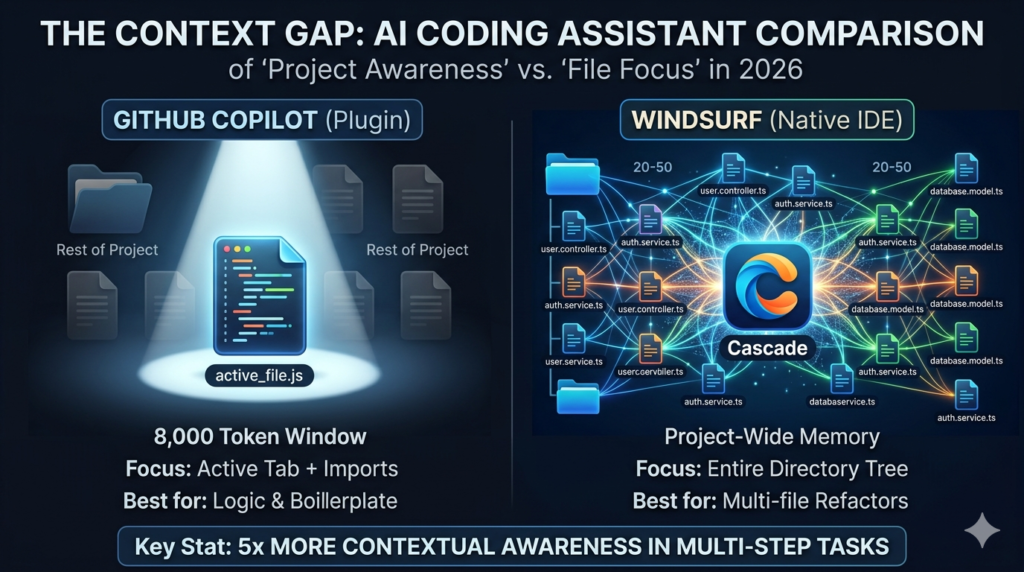
Copilot maintains 8,000-token context windows within the active file. Windsurf’s Cascade tracks changes across 20 to 50 files simultaneously through persistent project-wide memory. Copilot generates suggestions in 200 to 500 milliseconds. Cascade executes multi-file refactoring tasks in 5 to 30 seconds. Both tools use GPT-based models for code generation.
GitHub Copilot vs Windsurf: Architecture and Workflow Comparison
GitHub Copilot is an AI coding assistant plugin developed by Microsoft and GitHub for VS Code, JetBrains, and Neovim. Windsurf is an AI-native integrated development environment built by Codeium with Cascade, an autonomous workflow system for multi-file operations.
There are 8 key differences between GitHub Copilot and Windsurf: architecture design, multi-file editing capabilities, context retention systems, pricing structures, workflow automation approaches, debugging methodologies, ecosystem dependencies, and enterprise deployment options. GitHub Copilot operates as a plugin within existing code editors. Windsurf functions as a standalone development environment with built-in AI capabilities.
GitHub Copilot costs $10 per month for individual developers and $19 per user per month for business teams. Windsurf pricing ranges from $15 to $20 per month for professional tiers with expanded Cascade access. Both tools use GPT-based language models for code generation, including GPT-4 and GPT-4 Turbo variants.
What Is GitHub Copilot?
GitHub Copilot is an AI-powered code completion plugin that integrates into VS Code, JetBrains IDEs, and Neovim. The plugin generates code suggestions based on natural language comments and existing code patterns within the active file.
Microsoft and GitHub launched Copilot in June 2021 as a commercial product. The tool uses OpenAI’s GPT models trained on public code repositories. Developers install Copilot as an extension within their existing IDE without replacing the core development environment.
GitHub Copilot supports 10 major IDEs and editors: Visual Studio Code, Visual Studio, JetBrains IntelliJ IDEA, JetBrains PyCharm, JetBrains WebStorm, JetBrains Rider, JetBrains PhpStorm, Neovim, Vim, and Emacs. According to GitHub’s 2023 developer survey, Copilot users report 55% faster task completion for repetitive coding tasks compared to manual coding.
What Is Windsurf?
Windsurf is an AI-native integrated development environment that includes Cascade, an agentic coding system for autonomous multi-file operations. Codeium developed Windsurf as a standalone IDE rather than a plugin for existing editors.
Cascade operates as an autonomous workflow engine within Windsurf. The system plans multi-step development tasks, executes code changes across multiple files, runs verification tests, and adjusts implementations based on test results. Developers describe high-level goals to Cascade instead of manually orchestrating individual file edits.
Windsurf includes 5 core components: code editor, file explorer, integrated terminal, debugging tools, and Cascade workflow manager. The IDE supports Python, JavaScript, TypeScript, Java, C++, Go, Rust, PHP, Ruby, and Swift development without requiring external plugin installations. Learn more about AI-native development environments and how they differ from traditional code editors.
Architecture Comparison: Plugin vs Native IDE Structure
GitHub Copilot operates as a plugin architecture that integrates into existing IDEs. Windsurf uses a native IDE architecture with built-in AI capabilities throughout the core system.
Plugin Integration Model
GitHub Copilot requires VS Code version 1.74 or higher, JetBrains IDEs version 2021.3 or later, or Neovim with specific plugin support. The plugin communicates with Microsoft’s cloud-based GPT models through API calls. Developers maintain their existing IDE configurations, themes, extensions, and keyboard shortcuts after installing Copilot.
The plugin architecture preserves 3 key elements: existing workflow patterns, installed extension libraries, and customized IDE settings. Developers continue using ESLint, Prettier, GitLens, and other VS Code extensions alongside Copilot without compatibility conflicts.
Native IDE Structure
Windsurf operates independently without requiring VS Code, JetBrains, or other IDE installations. The application includes a code editor, file explorer, terminal, and debugging tools as native features. Cascade integrates directly into the IDE’s core functionality rather than operating through plugin APIs.
Windsurf users adopt a new development environment with different keyboard shortcuts, interface patterns, and workflow structures. The migration from VS Code to Windsurf requires learning the new IDE’s navigation systems, command palette alternatives, and file management approaches. Compare this with Claude Code vs Cursor for similar IDE architecture differences.
Multi-File Editing: Sequential Suggestions vs Autonomous Coordination
GitHub Copilot provides sequential file-by-file code suggestions within the active editor window. Windsurf executes autonomous multi-file refactoring operations through Cascade’s coordination system.
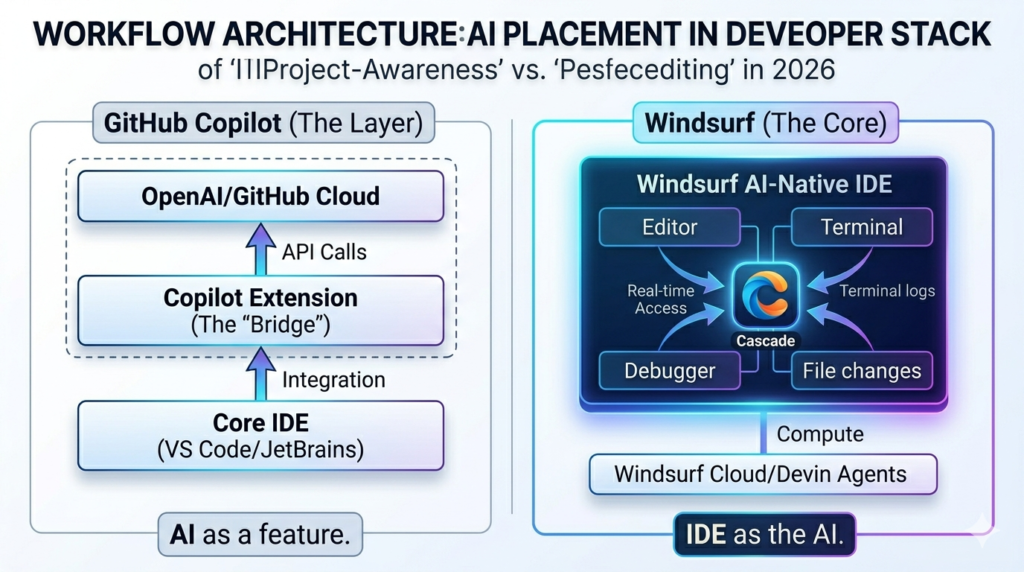
Single-File Context Management
GitHub Copilot analyzes approximately 8,000 tokens of surrounding code within the currently open file. The context window includes the active file content, recently viewed files, and imported modules. The model generates suggestions based on this limited context window without maintaining project-wide awareness.
Copilot context resets when developers close the IDE, switch to unrelated project directories, or move between files without clear import relationships. The plugin treats each coding session as relatively independent from previous sessions.
Project-Wide Context Retention
Windsurf’s Cascade maintains context across 20 to 50 files simultaneously during refactoring operations. The system tracks relationships between files through import statements, function calls, class inheritance, and shared data structures. Context persists throughout development sessions lasting multiple hours without manual context rebuilding.
Cascade identifies all files affected by a requested change. The system generates coordinated modifications across those files. Updates remain synchronized to prevent type mismatches, broken function signatures, and inconsistent variable names across the codebase.
Practical Example: API Endpoint Modification
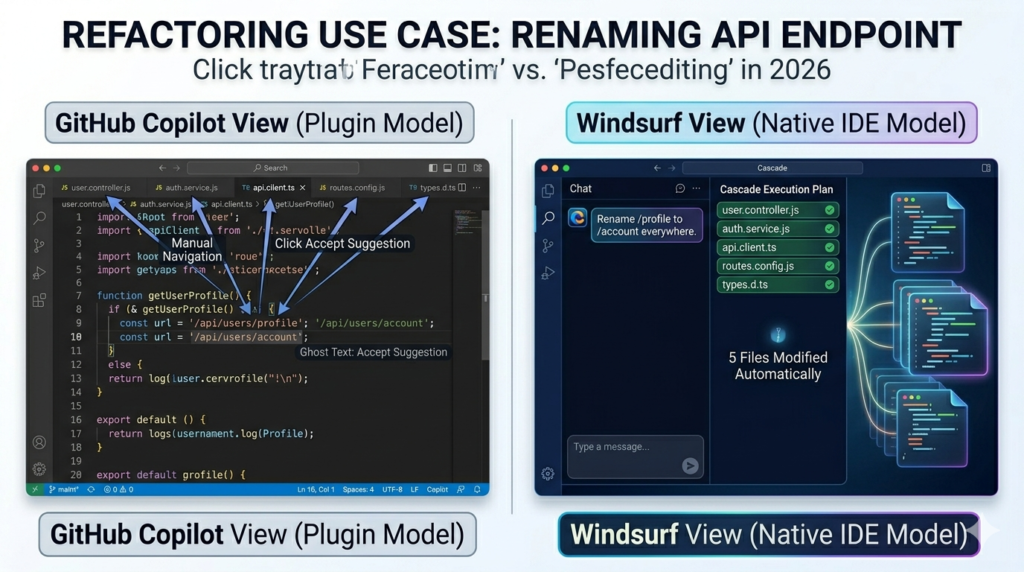
Renaming an API endpoint from /api/users/profile to /api/users/account across a React and Node.js project demonstrates the workflow differences.
GitHub Copilot users manually navigate to 5 files: the Express route handler, the frontend API client, the TypeScript interface definition, the API documentation, and the integration tests. Developers rename the endpoint in each file individually while accepting Copilot’s autocomplete suggestions for the new endpoint name.
Windsurf users describe the change to Cascade: “Rename the /api/users/profile endpoint to /api/users/account across all files.” Cascade identifies the 5 affected files, updates the route definition, modifies the frontend fetch calls, adjusts the TypeScript types, changes the documentation, and updates test assertions in a coordinated operation.
Code Completion vs Agentic Coding Workflows
GitHub Copilot prioritizes inline autocomplete suggestions for individual code blocks. Windsurf prioritizes autonomous task execution through multi-step agentic workflows.
Autocomplete Interaction Pattern
GitHub Copilot generates code completions as developers type. Suggestions appear inline within 200 to 500 milliseconds of typing pauses. Developers accept suggestions using the Tab key, reject them by continuing to type, or request alternative suggestions using keyboard shortcuts.
Copilot excels at 5 specific coding tasks: boilerplate code generation, API integration patterns, common algorithm implementations like sorting and searching, function completion from comments, and unit test generation from function signatures. The tool operates through a suggest-accept-reject interaction cycle.
Agentic Workflow Execution
Windsurf’s Cascade executes multi-step development tasks without continuous developer input. Developers describe high-level goals like “implement user authentication with JWT tokens and role-based access control.” Cascade breaks the request into subtasks, implements each component, verifies correctness through tests, and handles errors autonomously.
Cascade operates through 4 workflow stages: task planning, code generation, verification testing, and error correction. The system generates database migration files, implements authentication middleware, updates API route handlers, adds frontend login components, writes integration tests, and adjusts implementations when tests fail.
Compare agentic coding approaches with traditional autocomplete systems in Cursor vs Copilot workflows for similar architectural differences.
Pricing Structure: Individual and Enterprise Tiers
GitHub Copilot costs $10 per month for individual developers and $19 per user per month for business subscriptions. Windsurf pricing follows Codeium’s tiered model with free, pro, and enterprise options.
Individual Developer Costs
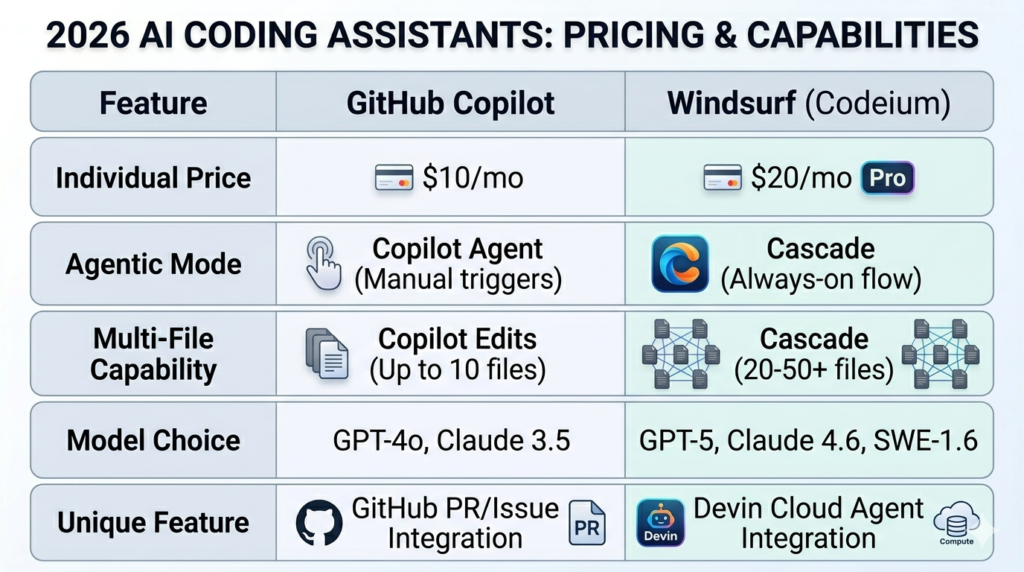
GitHub Copilot Individual includes 3 core features: code completions, chat interface access, and CLI tool integration. The subscription costs $10 per month or $100 per year with annual billing. Students, teachers, and verified open-source maintainers receive free Copilot access through GitHub’s education program.
GitHub Copilot Business costs $19 per user per month with organization license management, policy controls for code suggestion filtering, and priority support channels. Business subscriptions require a minimum of 2 user licenses.
Windsurf offers 3 pricing tiers: Free tier with basic code completions and limited Cascade usage, Pro tier at approximately $15 to $20 per month with expanded Cascade capabilities and priority model access, and Enterprise tier with custom pricing for on-premises deployment options.
Enterprise Licensing Options
GitHub Copilot Enterprise provides custom pricing for organizations requiring advanced security features, audit logging systems, and integration with GitHub Advanced Security. Enterprise plans include private model training capabilities on organization-specific codebases.
Windsurf Enterprise offers custom pricing for teams requiring 4 enterprise features: on-premises Cascade instances, custom model fine-tuning, advanced security controls, and dedicated support channels. Enterprise deployments maintain code within customer-controlled infrastructure without external API dependencies.
According to GitHub’s productivity research, organizations implementing Copilot report $1,500 to $2,000 annual value per developer through reduced time writing boilerplate code and faster feature implementation. Similar ROI analyses exist for Gemini vs Copilot enterprise deployments.
VS Code Ecosystem vs Standalone Environment
GitHub Copilot preserves existing VS Code workflows with all installed extensions, themes, and configurations. Windsurf requires adopting a new development environment with different keyboard shortcuts and interface patterns.
Extension Ecosystem Compatibility
VS Code hosts over 40,000 extensions covering linters like ESLint and TSLint, formatters including Prettier and Black, version control tools such as GitLens and Git Graph, database clients like MySQL Workbench and MongoDB Compass, and language servers for Python, Java, Go, Rust, and TypeScript. GitHub Copilot users access this complete extension marketplace without limitations.
Windsurf includes a smaller extension library with common development tools: ESLint for JavaScript linting, Prettier for code formatting, Python language server, TypeScript language server, and Git integration. Niche VS Code extensions may lack Windsurf equivalents, requiring developers to verify tool compatibility before migration.
Keyboard Shortcut Differences
GitHub Copilot inherits VS Code’s default keyboard shortcuts: Ctrl+P for file navigation, Ctrl+Shift+P for command palette access, Ctrl+D for multi-cursor editing, and Ctrl+` for terminal toggling. Developers maintain existing muscle memory and productivity patterns after installing the Copilot plugin.
Windsurf uses different default keyboard shortcuts requiring 3 to 7 days of adaptation for experienced VS Code users. The IDE supports custom keybinding configuration to match VS Code patterns, reducing the learning curve for developers migrating from Microsoft’s ecosystem.
Context Retention: Session Memory Architecture
Windsurf maintains project-wide development context throughout multi-hour coding sessions. GitHub Copilot resets context when switching between unrelated files or restarting the IDE.
Token-Based Context Windows
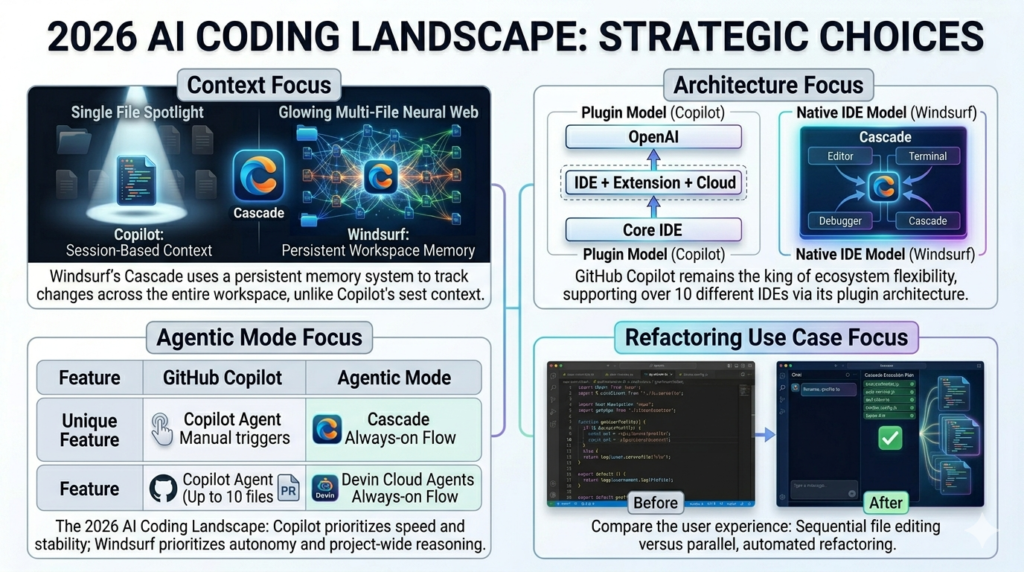
GitHub Copilot analyzes the current file and recently viewed files within its 8,000 token limit. The context window includes approximately 6,000 to 8,000 words of code depending on syntax density. Long development sessions spanning multiple hours lose historical context from earlier work as the token window slides forward.
The model treats each file interaction as relatively independent. Context connections exist only through explicit imports, function calls visible in open files, and comments referencing other code sections.
Persistent Context Tracking
Windsurf’s Cascade retains context throughout 4 to 6 hour development sessions. The system tracks the sequence of code changes, understands the evolution of the codebase structure, and maintains awareness of completed tasks when suggesting next implementation steps.
Cascade understands relationships between files within the same project directory structure. The system preserves awareness of changes made across multiple components, maintaining consistency when developers return to previously edited files after hours of working elsewhere in the codebase. This persistent memory resembles patterns in Claude vs ChatGPT conversation context handling.
Debugging and Error Resolution Approaches
GitHub Copilot suggests single-file error fixes through its chat interface. Windsurf’s Cascade identifies multi-file error patterns and proposes coordinated fixes across affected components.
Inline Error Correction
GitHub Copilot analyzes compilation errors, linting warnings, and runtime exceptions within the active file. Developers paste error messages into Copilot Chat, and the model generates potential solutions based on the surrounding code context. The chat interface provides 3 to 5 fix suggestions with explanations of why each approach resolves the error.
The process remains manual and file-focused. Copilot does not automatically propagate fixes across related files when errors stem from type mismatches, API contract changes, or database schema modifications affecting multiple components.
Cross-File Error Analysis
Windsurf identifies errors spanning 2 to 10 related files. When an API endpoint fails due to mismatched types between the controller, service layer, and database model, Cascade analyzes all three files simultaneously. The system identifies the type mismatch root cause, generates coordinated changes across the controller interface, service implementation, and database schema, and presents a unified fix addressing all related issues.
Cascade traces errors through import chains and function calls across files. The system presents fixes that maintain consistency across frontend API clients, backend route handlers, database queries, and TypeScript type definitions without requiring developers to manually identify each affected file.
Best Use Cases for GitHub Copilot
GitHub Copilot fits developers in 4 specific scenarios: existing VS Code workflow preservation, autocomplete-driven productivity, budget-conscious individual developers, and Microsoft ecosystem integration requirements.
VS Code Workflow Preservation
Teams with heavily customized VS Code setups including 10 or more extensions avoid migration complexity by adding Copilot as a plugin. Organizations standardized on VS Code, ESLint, Prettier, GitLens, Docker, and Kubernetes extensions maintain their complete toolchain while adding AI code suggestions.
The plugin architecture preserves custom themes, keybindings, and workspace configurations. Developers continue using Dracula, Night Owl, or One Dark Pro themes alongside Copilot without visual disruption.
Autocomplete-Driven Development
Developers spending most time writing new functions rather than refactoring existing code benefit from Copilot’s sub-500-millisecond suggestion speed. Projects involving rapid prototyping, proof-of-concept development, and greenfield application building leverage autocomplete effectively.
Microservices architectures where each service contains isolated, self-contained code files suit Copilot’s file-focused suggestions. Services with minimal cross-file dependencies operate efficiently within Copilot’s context window limitations.
Budget Accessibility
The $10 per month individual plan offers accessible AI coding assistance for freelancers, students, and open-source contributors. Free access for verified students and maintainers reduces adoption barriers for educational and community development work. Compare pricing with Jasper AI vs ChatGPT for similar budget-focused comparisons.
Microsoft Ecosystem Integration
Organizations using GitHub Enterprise, Azure DevOps, and Visual Studio benefit from Copilot’s native integration across Microsoft’s developer platform. The tool connects with GitHub repositories, pull request workflows, Azure Pipelines, and GitHub Actions without additional configuration steps.
Best Use Cases for Windsurf
Windsurf fits developers in 4 specific scenarios: large codebase refactoring, autonomous workflow delegation, context-heavy development sessions, and full-stack application development.
Large Codebase Refactoring
Projects with 50 or more interconnected files benefit from Cascade’s multi-file awareness. Renaming classes used across 20 files, updating API contracts affecting 15 endpoints, and modifying database schemas referenced in 30 queries becomes manageable through Cascade’s autonomous coordination.
Enterprise applications with complex domain models, multiple service layers, and extensive integration tests leverage Windsurf’s ability to maintain consistency across architectural boundaries.
Autonomous Task Delegation
Developers seeking to delegate multi-step implementation tasks use Cascade’s agentic capabilities. Requests like “implement user authentication with JWT tokens, role-based access control, password reset functionality, and email verification” execute autonomously through Cascade rather than requiring constant autocomplete interactions.
The workflow suits architects and senior developers who design systems at a high level while delegating implementation details to Cascade’s autonomous execution engine.
Context-Heavy Development Sessions
Development sessions spanning 4 to 6 hours benefit from Windsurf’s persistent context retention. Long debugging sessions, complex feature implementations, and extensive refactoring operations maintain context throughout the work period without losing historical awareness.
The persistent memory prevents context loss that occurs in autocomplete systems when developers close IDEs, switch projects, or take breaks between coding sessions. This memory architecture resembles approaches in Perplexity vs Claude search context retention.
Full-Stack Development
Building applications requiring coordinated changes across React components, Node.js APIs, PostgreSQL schemas, and Redis caching layers leverages Cascade’s cross-component awareness. Changes propagate correctly through frontend state management, API endpoints, database queries, and caching logic without manual synchronization.
Performance Metrics: Speed and Accuracy
GitHub Copilot generates autocomplete suggestions in 200 to 500 milliseconds on average. Windsurf’s Cascade completes multi-file refactoring tasks in 5 to 30 seconds depending on project complexity.
Suggestion Latency
GitHub Copilot shows inline suggestions 200 to 500 milliseconds after typing pauses. Network latency to Microsoft’s cloud infrastructure affects response times based on geographic location and connection quality. Local model options reduce latency but require additional setup through Azure OpenAI Service.
Windsurf provides similar autocomplete speeds for single-line suggestions. Cascade operations executing multi-file changes take 5 to 30 seconds depending on the number of affected files, codebase size, and complexity of required changes.
Acceptance Rate Metrics
According to GitHub’s productivity research, Copilot suggestions achieve approximately 40% acceptance rates among developers. The metric measures how frequently developers accept suggestions without modification.
Higher acceptance rates occur for boilerplate code generation (60% to 70% acceptance) and common algorithm implementations (50% to 60% acceptance). Lower acceptance rates occur for complex business logic (20% to 30% acceptance) and domain-specific implementations (15% to 25% acceptance).
Windsurf has not published equivalent acceptance rate data for Cascade’s autonomous operations. The agentic workflow model requires developer review and verification before merging changes, similar to code review processes for human-generated implementations.
Feature Comparison Table
| Feature | GitHub Copilot | Windsurf |
| Architecture Type | Plugin for existing IDEs | Standalone AI-native IDE |
| Primary Capability | Autocomplete suggestions | Autonomous multi-file workflows |
| IDE Support | VS Code, JetBrains, Neovim, Vim, Emacs | Windsurf IDE only |
| Multi-File Coordination | Manual file-by-file | Autonomous via Cascade |
| Context Window Size | 8,000 tokens (current file + tabs) | Project-wide (20-50 files) |
| Pricing (Individual) | $10/month | $15-20/month (estimated) |
| Pricing (Business) | $19/user/month | Custom enterprise pricing |
| Learning Curve | Minimal (plugin installation) | Moderate (new IDE adoption) |
| Workflow Model | Suggest-accept-reject cycle | Agentic task execution |
| Extension Ecosystem | 40,000+ VS Code extensions | Growing library |
| Free Tier | Students, teachers, OSS maintainers | Limited free tier available |
| Best For | Autocomplete, existing workflows | Multi-file refactoring, complex projects |
Choosing Between GitHub Copilot and Windsurf
Choose GitHub Copilot when existing VS Code workflows are essential, autocomplete speed is the primary productivity metric, budget limits spending to $10 per month, or Microsoft ecosystem integration is required.
Choose Windsurf when multi-file refactoring is frequent, autonomous workflow delegation reduces cognitive load, context retention matters for long development sessions, or teams are comfortable adopting new development environments.
Evaluate both tools through 14-day trial periods before committing to annual subscriptions. Test Cascade’s multi-file capabilities on real codebases with at least 30 interconnected files. Compare time savings against GitHub Copilot’s autocomplete workflows on typical development tasks.
Alternative options include Cursor IDE for VS Code-compatible AI-native environments and Claude Code for command-line agentic coding workflows. Review Grok vs Claude and Deepseek vs ChatGPT for broader AI tool comparisons.