Make vs Zapier: 7 Core Differences in Workflow Automation Platforms (2026)
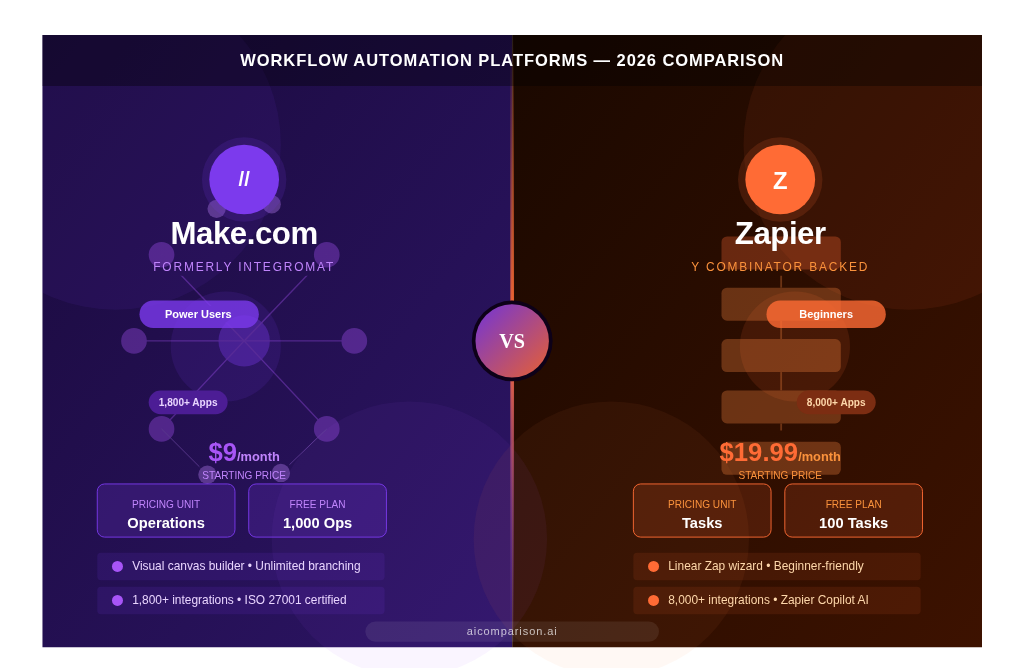
This Make vs Zapier comparison breaks down the 2 leading workflow automation platforms in 2026. Make.com, formerly Integromat, provides visual scenario building with deep logic control and operation-based pricing. Zapier connects over 8,000 apps through linear no-code Zaps with task-based pricing. The 7 core differences covered in this Zapier vs Make guide are ease of use, workflow complexity, integrations, pricing, AI automation, security, and use cases. Browse the full AI Comparison Tools library for more platform-vs-platform breakdowns.
What is the Difference Between Make and Zapier?

Make and Zapier differ across 3 core dimensions: workflow architecture, pricing model, and integration depth. Make.com builds automations on a visual canvas with operation-based pricing and deep API control. Zapier builds automations through a linear step-by-step wizard with task-based pricing and a broader app library of 8,000+ integrations.
| Feature | Make.com | Zapier |
| Founded | 2022 (rebranded from Integromat) | 2011 |
| Headquarters | Prague, Czech Republic | San Francisco, USA |
| Backed By | Celonis | Y Combinator |
| Builder Type | Visual drag-and-drop canvas | Linear step-by-step wizard |
| Pricing Unit | Operations | Tasks |
| Integrations | 1,800+ | 8,000+ |
| Free Plan | 1,000 operations/month | 100 tasks/month |
| Best For | Developers, technical users | Beginners, marketers |
What is Make.com?
Make.com is a visual workflow automation platform headquartered in Prague, Czech Republic, rebranded from Integromat in February 2022. It builds automations through drag-and-drop Scenarios on an infinite canvas.
Make supports unlimited branching via Routers, array processing via Iterators and Aggregators, and custom API calls via the HTTP module. Make charges per operation every module execution, including polling checks, counts toward the monthly limit.
What is Zapier?
Zapier is a no-code automation platform founded in 2011, headquartered in San Francisco, and backed by Y Combinator. It connects over 8,000 apps through linear Zaps built in a step-by-step wizard interface.
Zapier charges per task each completed action in a Zap counts toward the monthly limit. Zapier expanded into a full AI orchestration suite in 2026, adding Zapier Agents, Zapier Central, Zapier Tables, and Zapier Interfaces as dedicated products.
Which Platform is Easier to Use Make or Zapier?

Zapier is easier to use than Make.com. Zapier’s linear Zap builder deploys automations in under 5 minutes through a guided wizard interface. Make.com requires familiarity with visual canvas concepts including bundles, iterators, and aggregators before effective use. Make’s 2026 Maia AI assistant reduces this barrier by generating complete scenario structures from plain-language descriptions directly on the canvas.
How Does Zapier’s Linear Workflow Builder Work?
Zapier’s workflow builder operates on a sequential trigger-action model. Every Zap starts with 1 trigger and chains actions in a top-down vertical interface. The builder has 3 core structural components:
- Trigger monitors a source app for a specific event, such as a new lead in Facebook Lead Ads, a new row in Google Sheets, or a new contact in HubSpot
- Actions executes tasks in destination apps, such as creating a deal in Salesforce, sending a Slack notification, or adding a subscriber to Mailchimp
- Paths branches the Zap into up to 10 conditional variations per step based on filter criteria, such as routing leads above $10,000 deal value to a dedicated sales sequence
Zapier Copilot generates complete Zap structures from natural language prompts. According to G2, Zapier holds a 4.5/5 rating based on ease of use across over 1,200 reviews.
How Does Make.com’s Visual Scenario Builder Work?
Make.com’s scenario builder operates on a node-based infinite canvas. Modules appear as circular icons connected by animated lines that display real-time data movement during execution. The builder has 4 structural elements:
- Modules individual app actions positioned freely on the canvas, each representing 1 specific API call to a connected service
- Routers branching nodes that split data into unlimited conditional paths using AND/OR logic, numeric comparisons, and regex pattern filters
- Iterators loop processors that break down arrays item by item, such as processing each product line in a multi-item Shopify order individually
- Aggregators data collectors that combine multiple processed outputs into 1 single structure, such as compiling individual invoice line items into a single finalized document
Make’s Maia AI assistant generates complete scenario blueprints from natural language, displayed immediately on the visual canvas for instant editing. According to G2, Make.com holds a 4.7/5 rating for value for money.
Which Platform Handles Complex Workflows Better?

Make.com handles complex workflows better than Zapier. Make supports unlimited branching via Routers, native array processing via Iterators and Aggregators, and the 2026 If-else and Merge module that reunifies branched paths into 1 single execution route. Zapier Paths limits branching depth to 3–5 per step and maintains a linear structure that becomes unmanageable in high-complexity scenarios.
| Complexity Feature | Make.com | Zapier |
| Branching | Unlimited Routers | Paths 3–5 per step max |
| Path Rejoining | If-else and Merge module (2026) | Not available |
| Array Handling | Iterators + Aggregators | Looping by Zapier (basic) |
| Error Handling | 4 directives: Ignore, Break, Resume, Retry | Auto-replay on paid plans only |
| Max Steps Per Workflow | Unlimited | 100 per Zap |
| Built-in Data Functions | 300+ functions inside modules | Formatter by Zapier separate step |
| Built-in Database | Data Stores + Custom Variables | Zapier Tables separate product |
What Advanced Workflow Features Does Make.com Support?
Make.com supports 7 advanced workflow features that process complex data without custom code:
- Routers split scenarios into unlimited conditional branches with AND/OR filter logic, numeric comparisons, and regex pattern matching for granular data routing
- Iterators process each item in a data array individually, such as handling each product in a 15-item Shopify order as a separate execution unit
- Aggregators combine multiple processed items into 1 output structure, such as merging 20 individual invoice line items into a single formatted document
- If-else and Merge module branch into conditional paths and reunify all paths into 1 execution route, eliminating downstream module duplication across every branch a 2026 Make release
- Error handling directives 4 options per module: Ignore (skip and continue), Break (store for manual review), Resume (apply a default value and continue), Retry (reattempt after a defined delay interval)
- HTTP module execute custom API calls to any service using all standard HTTP methods, custom headers, and OAuth2 authentication without requiring a dedicated Make connector
- Data Stores built-in key-value database that retains data between scenario runs, such as storing high-water mark IDs for incremental data syncs or cumulative totals for daily reports
What Multi-Step Workflow Capabilities Does Zapier Offer?
Zapier supports 5 multi-step workflow capabilities for standard business automation:
- Multi-step Zaps chain up to 100 sequential actions from 1 trigger across multiple apps, available on all Zapier paid plans including Starter, Professional, and Team
- Paths split Zaps into conditional branches, such as routing high-value leads above $5,000 to a Slack sales channel while adding standard leads below $5,000 to an email nurture sequence
- Filters halt a Zap from continuing when specific field conditions are not met, such as stopping execution entirely when a support ticket priority field does not equal “urgent”
- Formatter by Zapier transform text, numbers, and dates within a workflow, including time zone conversion, name capitalization, currency formatting, and basic arithmetic
- Auto-replay automatically retry failed steps caused by temporary API outages from services like Salesforce or HubSpot, available on Professional and Team plans
How Do Make and Zapier Integrations Compare?

Zapier leads in integration volume with 8,000+ apps. Make.com leads in integration depth with more granular API actions per connected app. Zapier covers niche and emerging SaaS tools including over 250 AI applications such as OpenAI, Anthropic Claude, and Perplexity. Make.com provides deeper access to the underlying API endpoints of its connected apps, exposing more specific action types per service than Zapier’s simplified connectors.
Zapier top 5 integrations: Slack, Salesforce, HubSpot, Gmail, and Google Sheets.
Make.com top 5 integrations: Google Workspace, Airtable, Shopify, Stripe, and Salesforce.
Which Platform Offers Better API and Webhook Support?
Make.com provides better API and webhook support than Zapier for technical teams. Make’s HTTP module functions as a universal API connector supporting all HTTP methods, custom headers, JSON parsing, and OAuth2 authentication natively within the visual canvas. Zapier supports webhooks and custom API requests through Webhooks by Zapier, restricted to paid tiers. Complex API responses in Zapier require a separate JavaScript code step via Code by Zapier. Make handles the same response parsing visually without additional code. For teams building advanced AI pipelines, Make’s HTTP module and JSON modules reduce integration overhead by eliminating the separate JavaScript code step Zapier requires.
How Do Make and Zapier Pricing Plans Compare?
Make.com is 6–13x cheaper than Zapier at scale. Make charges $9/month for 10,000 operations. Zapier charges $49/month for 2,000 tasks. At 100,000 monthly executions, Make costs $150–$250 while Zapier costs $500–$1,000+, according to pricing data from make.com and zapier.com respectively.
| Plan | Make.com | Make Price | Zapier | Zapier Price |
| Free | 1,000 ops/month | $0 | 100 tasks/month | $0 |
| Starter | 10,000 ops/month | $9/month | 750 tasks/month | $19.99/month |
| Pro | 10,000+ ops/month | $16–$29/month | 2,000 tasks/month | $49/month |
| High Volume | 50,000+ ops/month | $50–$100/month | 50,000 tasks/month | $299–$599/month |
| Enterprise | 100,000+ ops/month | $150–$250/month | 100,000+ tasks/month | $500–$1,000+/month |
Is Make.com Free to Use?
Yes, Make.com has a free plan that includes 1,000 operations per month, 2 active scenarios, and access to over 1,800 app integrations. The free plan resets every 30 days. Scenario execution time is limited to 5 minutes. The minimum polling interval is set at 15 minutes on the free plan, making it unsuitable for real-time automation requirements.
Which Platform is Cheaper at Scale?

Make.com is cheaper than Zapier at every volume tier above 750 monthly executions. A business processing 10,000 automation executions per month pays $9–$16 on Make versus $49–$69 on Zapier. Make’s operation-based model has 1 important pricing nuance: polling triggers consume operations every 5 minutes regardless of whether new data is found, adding up to 8,640 operations per month per scenario. Users eliminate this cost entirely by using webhook-based instant triggers, which consume operations only when data arrives. Zapier does not charge for empty polling checks, making it cheaper for very low-volume workflows below 750 monthly tasks that rely on polling triggers.
Which Platform Provides Better AI Automation?

Zapier leads in AI automation breadth with Zapier Copilot, Zapier Agents, and 8,000+ app access via MCP. Make.com leads in AI automation transparency with Maia and the 2026 Reasoning Panel that displays every AI decision and tool-call visually on the canvas in real time. For a broader survey of AI-powered platforms beyond automation, see the Best AI Tools guide.
| AI Feature | Make.com | Zapier |
| AI Workflow Assistant | Maia conversational builder | Zapier Copilot fully integrated |
| Agent Autonomy | Moderate guided by visual routes | High self-directed goal seeking |
| Logic Transparency | High visual Reasoning Panel | Lower prompt-driven logs |
| App Access via MCP | 1,800+ via MCP Toolboxes | 8,000+ via MCP Support |
| Specialized AI Products | Data Stores, Flow Control, Grid | Interfaces, Chatbots, Tables, Central |
What AI Features Does Zapier Copilot Offer?
Zapier Copilot delivers 4 core AI automation capabilities in 2026:
- Natural language Zap building generates complete Zap structures from a plain-language description, automatically selecting apps, configuring the trigger, and mapping action fields without manual setup
- Native AI steps extracts structured data from emails, classifies sentiment as positive or negative, and translates text directly within a Zap without requiring external OpenAI or Anthropic API keys
- MCP Support brings Zapier’s 8,000+ integrations directly into external AI environments including Claude Desktop and Cursor, turning Zapier into a remote action execution layer for any connected LLM relevant for teams comparing Cursor vs Copilot for AI-assisted development workflows
- Zapier Canvas maps entire AI-powered business systems visually, documenting how Zaps, Tables, and Agents interact across organizational workflows for team-wide visibility
What AI Features Does Make’s Maia Assistant Offer?
Make’s Maia assistant delivers 4 AI automation capabilities focused on visual transparency and complex agent workflows:
- Conversational scenario building generates complete scenario blueprints from natural language descriptions, displayed immediately on the visual canvas for direct editing and module adjustment
- Make AI Agents creates autonomous agents that use the visual builder as a structured decision tree, producing a fully auditable trail of every action taken and every reasoning step executed
- Reasoning Panel displays the exact logic and tool-calls the AI executes in real time on the canvas, directly addressing enterprise requirements for auditable and explainable AI behavior
- MCP Toolboxes exposes specific Make scenarios as callable tools for external LLMs, enabling a ChatGPT or Claude instance to trigger complex multi-branch Make scenarios through a single structured API call
What Are the Best Use Cases for Make vs Zapier?
Zapier serves 4 primary use cases: email automation, CRM syncing, marketing workflows, and simple app-to-app notifications. Make.com serves 4 primary use cases: data transformation, e-commerce order processing, complex multi-branch business processes, and high-volume API integrations.
| Use Case | Best Platform | Reason |
| Lead capture to CRM sync | Zapier | Linear, fast, 8,000+ templates |
| Slack notifications and alerts | Zapier | Simple trigger-action, sub-5-minute setup |
| Shopify multi-item order processing | Make.com | Iterator handles each line item individually |
| Stripe payment conditional routing | Make.com | Router branches by payment type, amount, or status |
| Salesforce data pipeline | Make.com | Deep API access, aggregator compiles records |
| HubSpot email campaign trigger | Zapier | Native HubSpot connector, pre-built templates |
| JSON API response processing | Make.com | HTTP module + native JSON parsing, no code needed |
| Batch report generation | Make.com | Iterators, aggregators, and Data Stores combined |
When Does Zapier Perform Better Than Make?
Zapier performs better than Make.com in 4 scenarios:
- Non-technical team deployment marketers, HR professionals, and sales managers build and manage Zaps without developer support, reducing IT dependency for routine automation tasks
- Niche app integrations Zapier’s 8,000+ library includes obscure SaaS tools and emerging startups months before Make.com adds dedicated connectors, covering tools like Typeform, Calendly, and Loom
- Rapid automation prototyping new business process workflows go live in under 5 minutes using pre-built Zap templates, making Zapier the faster choice when deployment speed outweighs logic complexity
- AI agent deployment Zapier Central and Zapier Agents provide higher agent autonomy with self-directed goal-seeking behavior across 8,000+ connected apps
When Does Make.com Perform Better Than Zapier?
Make.com performs better than Zapier in 4 scenarios:
- Complex branching logic workflows requiring 10+ conditional checks are managed visually in Make using 1 Router module versus duplicating dozens of downstream steps across every Zapier Path
- High-volume cost-sensitive automation businesses processing 10,000+ operations monthly save 60–70% on licensing fees on Make versus Zapier, based on official pricing from both platforms
- Technical API customization custom HTTP calls, OAuth2 authentication, and JSON data transformation require no code in Make versus a separate JavaScript code step in Zapier
- European GDPR compliance Make’s Czech Republic origin and EU server data residency provide a structural compliance advantage over Zapier’s US-based cloud infrastructure
Which Platform Offers Better Security and Compliance?

Both Make.com and Zapier are SOC 2 Type II compliant with AES-256 encryption at rest and TLS in transit. Make.com holds ISO 27001 certification and provides EU data residency. Zapier does not hold ISO 27001 certification and operates on US-based infrastructure. Neither platform is HIPAA compliant. Neither Make.com nor Zapier signs a Business Associate Agreement (BAA), making both platforms unsuitable for processing Protected Health Information under US federal law, according to hipaatimes.com and paubox.com.
| Compliance Standard | Make.com | Zapier |
| SOC 2 Type II | ✅ | ✅ |
| ISO 27001 | ✅ | ❌ |
| GDPR | ✅ EU data residency | ✅ EU-US Data Privacy Framework |
| HIPAA / BAA | ❌ No BAA | ❌ No BAA |
| Data Residency | EU servers Czech Republic and Germany | US-based cloud |
| SSO / SAML | ✅ Enterprise plan | ✅ Team and Enterprise plans |
| Audit Logs | ✅ Enterprise plan | ✅ Team and Enterprise plans |
Which Platform is Better for GDPR Compliance?
Make.com is better for GDPR compliance than Zapier. Make operates as a European company under EU jurisdiction with native data residency on Czech Republic and German servers. This simplifies Data Processing Addendum requirements and cross-border data transfer assessments for businesses operating within the EEA.
Zapier complies with the EU-US Data Privacy Framework but remains a US-based entity. Zapier’s US jurisdiction requires additional Data Privacy Framework review during strict GDPR audits regarding US government access to data stored on American servers.
Which Platform Offers a Better Mobile Experience and Customer Support?
Zapier provides native iOS and Android apps for monitoring Zaps and approving human-in-the-loop AI steps on the go. Make.com has no dedicated mobile app — scenario management on Make is limited to a responsive web browser on mobile devices. Both platforms scale support access by pricing tier, with live chat and priority support reserved for paid plans on each platform.
| Feature | Make.com | Zapier |
| Native Mobile App | Not available (web only) | iOS and Android apps |
| Mobile Capabilities | Browser-based scenario viewing | Zap monitoring, approvals, push notifications |
| Free Plan Support | Community forum | Email support |
| Paid Plan Support | Email + live chat | Email + live chat |
| Enterprise Support | Dedicated account manager | Priority phone and chat support |
Does Zapier Have a Mobile App?
Yes, Zapier offers native iOS and Android apps. The Zapier mobile app lets users monitor Zap run history, approve or reject AI Agent actions awaiting human confirmation, and receive push notifications when a Zap fails, though full Zap building remains a desktop-only workflow.
Does Make.com Have a Mobile App?
No, Make.com does not offer a dedicated mobile app. The visual canvas builder is designed for larger screens, and Make.com scenario management on mobile devices is limited to viewing execution history through a mobile browser.
What Are the Best Alternatives to Make and Zapier?
The 4 strongest alternatives to Make and Zapier are n8n, Pabbly Connect, Workato, and Microsoft Power Automate. Each serves a distinct user segment based on budget, data control requirements, and technical depth.
Businesses searching for Zapier alternatives or Zapier competitors typically fall into 1 of 4 categories: developers wanting self-hosted control, budget-conscious teams, enterprise IT departments, and Microsoft-native organizations. n8n serves the first group with free self-hosted execution. Pabbly Connect serves the second with a ~$249 lifetime deal. Workato and Microsoft Power Automate serve the third and fourth, respectively. A dedicated Zapier Alternatives guide ranks all 10 options by pricing and use case.
| Alternative | Type | Pricing | Best For |
| n8n | Self-hosted open-source | Free self-hosted / $20+ cloud | Developers requiring full data sovereignty |
| Pabbly Connect | No-code cloud | ~$249 lifetime deal | Budget-conscious small businesses |
| Workato | Enterprise iPaaS | $10,000+/year | Fortune 500 enterprise automation |
| Microsoft Power Automate | No-code and low-code | Included in Microsoft 365 | Organizations on the Microsoft ecosystem |
Organizations already standardized on Microsoft 365 that are also evaluating Microsoft Teams Alternatives often extend that same evaluation to Power Automate for workflow automation inside the Microsoft ecosystem.
How Does n8n Compare to Make and Zapier?
n8n is a self-hosted open-source automation platform that provides 100% data sovereignty with free unlimited executions on self-hosted instances, compared to Zapier’s task-metered cloud-only model starting at $19.99/month. n8n’s approximately 400–600 native integrations trail Zapier’s 8,000+ app library, but self-hosted execution carries no per-task ceiling once deployed. A full n8n vs Zapier comparison covers the technical architecture differences in depth.
n8n executes custom JavaScript and Python code nodes natively. n8n connects directly to internal databases including PostgreSQL, MySQL, and Redis without REST API intermediaries. n8n is the only automation tool in this category that satisfies strict HIPAA and PCI-DSS compliance requirements through complete self-hosting and on-premises deployment.
For teams evaluating the full range of n8n alternatives, including Make, Zapier, Pabbly, and Workato, the primary differentiator is data residency control versus integration breadth.
Make vs Zapier Which Automation Platform Should You Choose?
Choose Zapier for simple, fast, beginner-friendly automation with 8,000+ integrations and advanced AI agent capabilities. Choose Make.com for complex visual workflows, high-volume cost efficiency, and European data residency. Organizations in 2026 with mature automation operations use a hybrid approach Zapier for front-office simple automations and Make.com or n8n for complex back-office data pipelines maximizing integration breadth alongside logic depth.
Choose Zapier If…
- The team includes non-technical users such as marketers, sales managers, or HR professionals who build automations without developer support
- Niche or obscure app integrations are required that Make.com does not yet support, including tools like Typeform, Calendly, or Loom
- Monthly task volume stays below 5,000 tasks, where Zapier’s per-task pricing remains competitive against Make’s operation-based model
- AI agent capabilities are a priority Zapier Central and Zapier Agents provide higher agent autonomy than Make’s current Maia-guided approach
Choose Make.com If…
- Workflows require complex branching, array looping, or path merging that exceeds Zapier’s linear Paths capability with its 3–5 branch limit
- Monthly operation volume exceeds 10,000 executions, where Make delivers 60–70% cost savings over equivalent Zapier plans based on official pricing
- Full API customization is required HTTP module, JSON parsing, and OAuth2 authentication are handled visually without JavaScript code steps
- EU data residency is a hard compliance requirement for GDPR-regulated businesses operating within the European Economic Area
Frequently Asked Questions About Make vs Zapier
Is Make.com the Same as Integromat?
Yes. Integromat rebranded to Make.com in February 2022 with a major UI overhaul and a more scalable backend architecture. The platform retained its core visual scenario philosophy. Key additions since the rebrand include Maia AI assistant, Make AI Agents with the Reasoning Panel, the If-else and Merge module, and MCP Toolboxes for external LLM integration.
Which Platform is Better for Beginners?
Zapier is better for beginners than Make.com. Zapier’s linear step-by-step wizard, pre-built library of 8,000+ Zap templates, and Copilot AI builder reduce setup time to under 5 minutes. Make.com’s visual canvas requires understanding concepts including bundles, iterators, and aggregators before effective use, presenting a steeper initial learning curve for non-technical users.
Which Platform is Better for AI Automation in 2026?
Zapier leads in AI automation breadth. Make.com leads in AI automation transparency. Zapier Copilot, Zapier Agents, and Zapier Central provide higher agent autonomy with access to 8,000+ apps via MCP. Make’s Maia assistant and Reasoning Panel provide full visibility into every AI decision made during scenario execution, making Make the preferred platform for enterprises that require auditable and explainable AI workflows.
Explore more comparisons: Zapier Alternatives.
Explore more comparisons: Best AI Productivity Tools.
For more automation platform comparisons like this one, visit our full library on the AI Comparison homepage.


