Midjourney vs Adobe Firefly: Which Is Better in 2026?
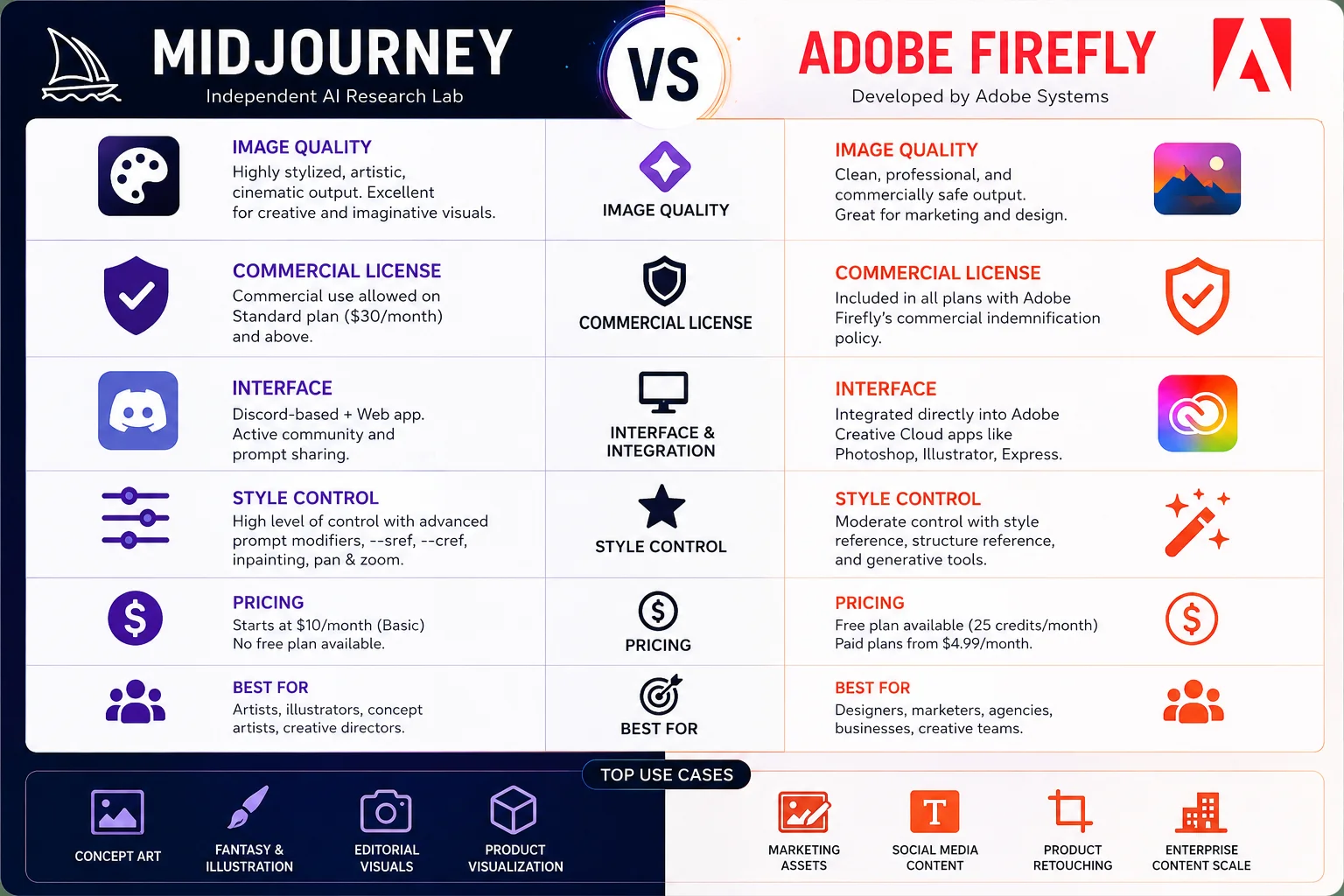
Midjourney produces highly stylized, cinematic images through a Discord-based interface, developed by an independent AI research lab. Adobe Firefly generates commercially licensed images directly inside Adobe Creative Cloud applications, including Photoshop and Illustrator, developed by Adobe Systems. Both tools lead the AI image generation category in 2025 but they serve fundamentally different users.
Designers evaluating best AI image generators face 4 core decision points: image quality, commercial licensing, ease of use, and pricing. This comparison covers all 4 dimensions using verified feature data, official pricing from Midjourney’s pricing page and Adobe’s Firefly terms of service, and benchmark performance data to help creators, marketers, and design professionals choose the correct tool.
Quick verdict: Midjourney V6.1 produces superior artistic output. Adobe Firefly Image Model 3 delivers commercially indemnified images integrated into professional Adobe design workflows.
Midjourney vs Adobe Firefly: Quick Comparison
| Feature | Midjourney | Adobe Firefly |
| Best For | Artists, creative directors | Designers, marketing teams |
| Interface | Discord + Web app | Adobe Creative Cloud apps |
| Free Plan | No | Yes (25 credits/month) |
| AI Model | Midjourney V6.1 | Firefly Image Model 3 |
| Commercial License | Standard plan ($30/month) and above | Included in all plans |
| Photoshop Integration | Not supported | Yes native |
| Style Control | High | Moderate |
| Overall Rating | 4.6 / 5 | 4.3 / 5 |
What Is Midjourney?
Midjourney is an AI image generator that produces high-quality, stylized images from text prompts. Midjourney operates through a Discord server and a web interface at midjourney.com. The platform uses a proprietary diffusion model trained on a curated dataset of artistic and photographic works.
Midjourney V6.1, the current production model, generates images at up to 4x resolution with enhanced text rendering and improved prompt adherence. According to Midjourney’s official community statistics, over 16 million users actively use the platform as of 2025.
Key Features of Midjourney
Midjourney includes 6 standout capabilities for creative professionals:
- High-realism output V6.1 generates photorealistic portraits, environments, and product renders
- Style reference (–sref) uploads a reference image to maintain visual consistency across generations
- Character reference (–cref) preserves character appearance across multiple image generations
- Vary (Region) applies inpainting to specific image areas without regenerating the full image
- Pan and zoom extends existing images directionally to create wider compositions
- Niji mode produces anime-style artwork using a model trained specifically on Japanese illustration styles
Pros and Cons of Midjourney
Advantages:
- Produces the highest artistic quality output among AI image generators, including DALL-E 3 and Stable Diffusion
- Supports advanced prompt modifiers for precise style and composition control
- Generates images at commercial quality without requiring external upscaling tools
Disadvantages:
- Requires a paid subscription no free tier exists on the platform
- Discord-based interface creates onboarding friction for non-technical users
- Integrates with no native Adobe Creative Cloud or Figma workflows
Best Use Cases for Midjourney
Midjourney performs best across 4 professional workflows: concept art production, marketing campaign visuals, editorial illustration, and product visualization. Creative directors use Midjourney V6.1 to generate mood boards and client presentation visuals at production quality within minutes.
What Is Adobe Firefly?
Adobe Firefly is an AI image generation system developed by Adobe, integrated natively into Adobe Photoshop, Adobe Illustrator, and Adobe Express. Firefly Image Model 3, the current version, generates images from text prompts and supports Generative Fill, Generative Expand, and text-to-vector generation.
According to Adobe’s official Firefly documentation, Firefly Image Model 3 trains exclusively on Adobe Stock licensed content, openly licensed works, and public domain material making every generated image commercially safe by design. Adobe’s commercial indemnification policy, published in the Adobe Firefly terms of service, covers all outputs produced on paid plans.
Key Features of Adobe Firefly
Adobe Firefly includes 6 core capabilities for professional design teams:
- Generative Fill replaces selected areas of a Photoshop image using text prompts
- Generative Expand extends image boundaries in any direction while maintaining visual consistency
- Text-to-vector generates editable SVG vector graphics from text descriptions
- Structure reference preserves the spatial layout of a reference image while changing its style
- Style reference applies a visual style from a reference image to new generations
- Firefly for Enterprise deploys custom-trained Firefly models using brand assets for large teams
Pros and Cons of Adobe Firefly
Advantages:
- Integrates directly into Photoshop and Illustrator without plugin installation
- Provides commercial content indemnification on all paid plans
- Includes a free plan with 25 monthly generative credits
Disadvantages:
- Produces less stylistically distinctive output compared to Midjourney V6.1
- Free plan credit limits restrict professional-volume usage
- Custom model training requires an Enterprise subscription at custom pricing
Best Use Cases for Adobe Firefly
Adobe Firefly performs best in 4 workflows: marketing asset production, brand-safe social media content, product retouching inside Photoshop, and scalable enterprise content creation. Marketing teams using Adobe Creative Cloud integrate Firefly directly into existing Photoshop workflows without switching applications or platforms.
Midjourney vs Adobe Firefly: Feature-by-Feature Comparison
User Interface and Ease of Use
Adobe Firefly delivers a significantly lower learning curve than Midjourney. Firefly operates inside Photoshop’s familiar toolbar designers access Generative Fill through the same selection tools used daily. Midjourney requires Discord command syntax or the midjourney.com web interface, which presents an initial barrier for new users.
Beginners complete their first Adobe Firefly generation in under 3 minutes. Midjourney users typically spend 20 to 40 minutes learning prompt structure before producing intended results consistently.
Image Quality and Output Style

Midjourney V6.1 produces more artistically refined output than Adobe Firefly Image Model 3. Civitai’s 2024 community benchmark rated Midjourney V6.1 at 4.7 out of 5 for photorealism, compared to Adobe Firefly Image Model 3’s rating of 3.9 out of 5 on the same evaluation criteria. Midjourney generates images with cinematic lighting, complex backgrounds, and nuanced facial detail that Firefly does not consistently replicate.
Adobe Firefly generates clean, commercially appropriate images suited to branded content. Firefly output avoids stylistic extremes making it more predictable for marketing teams but less compelling for artistic projects. Users evaluating Midjourney vs Flux observe similar quality patterns across competing platforms, with Midjourney consistently leading on artistic output. For users comparing text-based AI image generation, Midjourney vs ChatGPT image generation provides an additional benchmark reference.
Commercial Licensing
Adobe Firefly holds a clear licensing advantage over Midjourney. Every image generated through Firefly on a paid plan carries Adobe’s commercial indemnification guarantee meaning Adobe accepts legal responsibility if generated content triggers a copyright dispute, as confirmed in Adobe’s published terms of service.
Midjourney’s official pricing page confirms commercial usage rights begin at the Standard plan ($30/month). The Basic plan ($10/month) restricts commercial use. Midjourney’s training dataset has faced legal scrutiny, and the platform does not offer content indemnification on any plan. For brand-safe content production, Adobe Firefly is the more legally defensible choice.
Integrations

Adobe Firefly integrates natively with 6 Adobe Creative Cloud applications: Photoshop, Illustrator, Adobe Express, Adobe Premiere Pro, Adobe After Effects, and Adobe Stock. No third-party plugin installation is required for any integration.
Midjourney integrates with no native design applications. Third-party connectors link Midjourney to external tools through unofficial APIs only. Creative teams running Adobe-based workflows benefit from Firefly’s deep integration ecosystem. For video generation workflows, best AI video generators covers platforms including Runway and Pika that extend beyond static image production.
AI Capabilities Comparison
| Capability | Midjourney V6.1 | Adobe Firefly Image Model 3 |
| Photorealism | Excellent | Good |
| Prompt adherence | High | Moderate |
| Inpainting | Yes Vary Region | Yes Generative Fill |
| Outpainting | Yes Pan and Zoom | Yes Generative Expand |
| Text rendering in images | Good | Excellent |
| Vector generation | Not supported | Yes text-to-vector SVG |
| Video generation | Not supported | Available in Adobe Premiere Pro via Firefly |
Midjourney vs Adobe Firefly Pricing: Which Costs Less?
Free Plan Comparison
Adobe Firefly includes a free plan with 25 generative credits per month. Free plan users access text-to-image generation, Generative Fill, and Generative Expand inside Adobe Express. Watermarks do not appear on free-plan outputs, and commercial use is permitted on free-plan images.
Midjourney offers no free plan. The platform discontinued its free trial in March 2023 following sustained server demand issues.
Paid Plan Comparison
| Plan | Midjourney | Adobe Firefly |
| Entry | $10/month 200 fast images/month | Free 25 credits/month |
| Standard | $30/month unlimited relaxed + 15 fast hours | $9.99/month 100 Firefly credits |
| Pro | $60/month 30 fast hours + stealth mode | $54.99/month Creative Cloud Single App |
| All Apps / Enterprise | $120/month per seat | $59.99/month Creative Cloud All Apps |
Pricing sourced from Midjourney’s official pricing page and Adobe’s Creative Cloud pricing page as of July 2025.
Which Tool Offers Better Value?
Adobe Firefly delivers superior value for users already subscribed to Adobe Creative Cloud Firefly credits are included within Creative Cloud subscriptions at no additional cost. Midjourney’s Standard plan at $30/month provides unlimited image generation in relaxed mode, making it cost-effective for high-volume artistic production outside an Adobe ecosystem.
Midjourney vs Adobe Firefly: Use Case Comparison
Best for Beginners
Adobe Firefly is better for beginners. Firefly’s integration inside Photoshop and Adobe Express removes the need to learn new interfaces, prompt syntax, or Discord navigation. Users with zero AI image generation experience produce usable output within their first session.
Best for Professional Artists and Concept Creators
Midjourney is better for professional artists, choose Midjourney for concept art and editorial illustration if the workflow operates outside Adobe Creative Cloud. Midjourney V6.1 produces output quality that concept artists, creative directors, and illustrators use directly in client deliverables. Users comparing Midjourney vs DALL-E 3 and Midjourney vs Stable Diffusion consistently rank Midjourney first for creative output quality across all comparison benchmarks.
Best for Marketing Teams
Adobe Firefly establishes itself as the reliable choice for marketing teams. Firefly’s commercial indemnification, Adobe Express integration, and brand-safe output suit teams producing high volumes of social media, email, and advertising assets. Marketing teams evaluating best AI marketing tools rate Firefly higher on compliance and workflow integration than any competing image generator.
Best for Developers and API Users
Adobe Firefly offers a publicly accessible Firefly API through Adobe Developer Console, with per-credit pricing for programmatic image generation. Midjourney provides API access through an official program, currently in limited availability with no public pricing. Developers building content pipelines benefit from Firefly’s documented, stable API and predictable cost structure. The broader best AI tools directory on aicomparison includes additional options for developers requiring API-first image generation at scale.
Midjourney vs Adobe Firefly: Which One Should You Choose?
Choose Midjourney if:
- Artistic quality and stylistic control are the primary requirements, if the workflow operates outside Adobe Creative Cloud
- High-volume image generation is needed at the Standard or Pro subscription tier
- Concept art, editorial illustration, or campaign mood boards represent the primary output type
- Photorealistic renders with advanced lighting and compositional depth are required
Choose Adobe Firefly if:
- Commercial licensing safety and content indemnification are required for client deliverables
- The existing workflow uses Adobe Photoshop, Illustrator, or Adobe Express natively
- A free starting tier is needed before committing to a paid plan
- Marketing or brand content production demands legally compliant, commercially safe AI-generated images
Alternatives to Midjourney and Adobe Firefly
| Alternative | Best For |
| Midjourney vs DALL-E 3 | ChatGPT-integrated image generation |
| Midjourney vs Stable Diffusion | Open-source, self-hosted generation |
| Midjourney vs Flux | Fast, high-fidelity photorealistic output |
| DALL-E 3 vs Stable Diffusion | Open-access alternative comparison |
| Kling AI vs Runway | AI video generation workflows |
| HeyGen vs Synthesia | AI avatar and video content production |
The best AI image generators guide covers 8 platforms with pricing, output quality, and use-case breakdowns across the full image generation category.
Frequently Asked Questions
Is Midjourney Better Than Adobe Firefly?
Midjourney produces higher artistic quality output, while Adobe Firefly provides better commercial licensing safety and Creative Cloud workflow integration. Midjourney V6.1 leads on photorealism and style control. Adobe Firefly leads on legal compliance and application integration.
Which Tool Is More Affordable?
Adobe Firefly is more affordable it includes a free plan with 25 monthly credits. Midjourney starts at $10/month with no free tier available. Users already subscribed to Adobe Creative Cloud access Firefly at no additional cost.
Which Tool Has Better AI Capabilities?
Midjourney V6.1 leads on image realism, style control, and compositional complexity. Adobe Firefly Image Model 3 leads on text rendering accuracy, SVG vector generation, and Photoshop workflow integration. Both tools support inpainting and outpainting with comparable functional coverage.
Which Tool Is Easier to Use?
Adobe Firefly is significantly easier to use. Firefly integrates into familiar Adobe Photoshop interfaces and requires no prompt syntax learning. Midjourney requires Discord command familiarity or web UI prompt training before producing intended results.
What Are the Best Alternatives to Both Tools?
The 4 strongest alternatives are DALL-E 3, Stable Diffusion, Flux, and Kling AI for video-adjacent generation workflows. Full breakdowns with pricing and output comparisons are available in the best AI image generators guide.
Final Verdict

Midjourney and Adobe Firefly serve distinct professional needs in 2025. Midjourney V6.1 delivers the highest artistic output quality available suited to concept artists, creative directors, and high-volume editorial producers. Adobe Firefly Image Model 3 delivers commercially safe, Photoshop-integrated image generation suited to marketing teams, brand designers, and enterprise workflows requiring legal content compliance.
- Best overall for artistic quality: Midjourney Standard $30/month
- Best for commercial safety: Adobe Firefly included in Creative Cloud
- Best for beginners: Adobe Firefly free plan with familiar Photoshop interface
- Best for enterprise teams: Adobe Firefly for Enterprise custom pricing with brand-trained model support
Explore the full AI comparison tools directory and best AI image generators guide on aicomparison for additional platform comparisons, verified pricing data, and use-case breakdowns across 90+ AI tools.

